
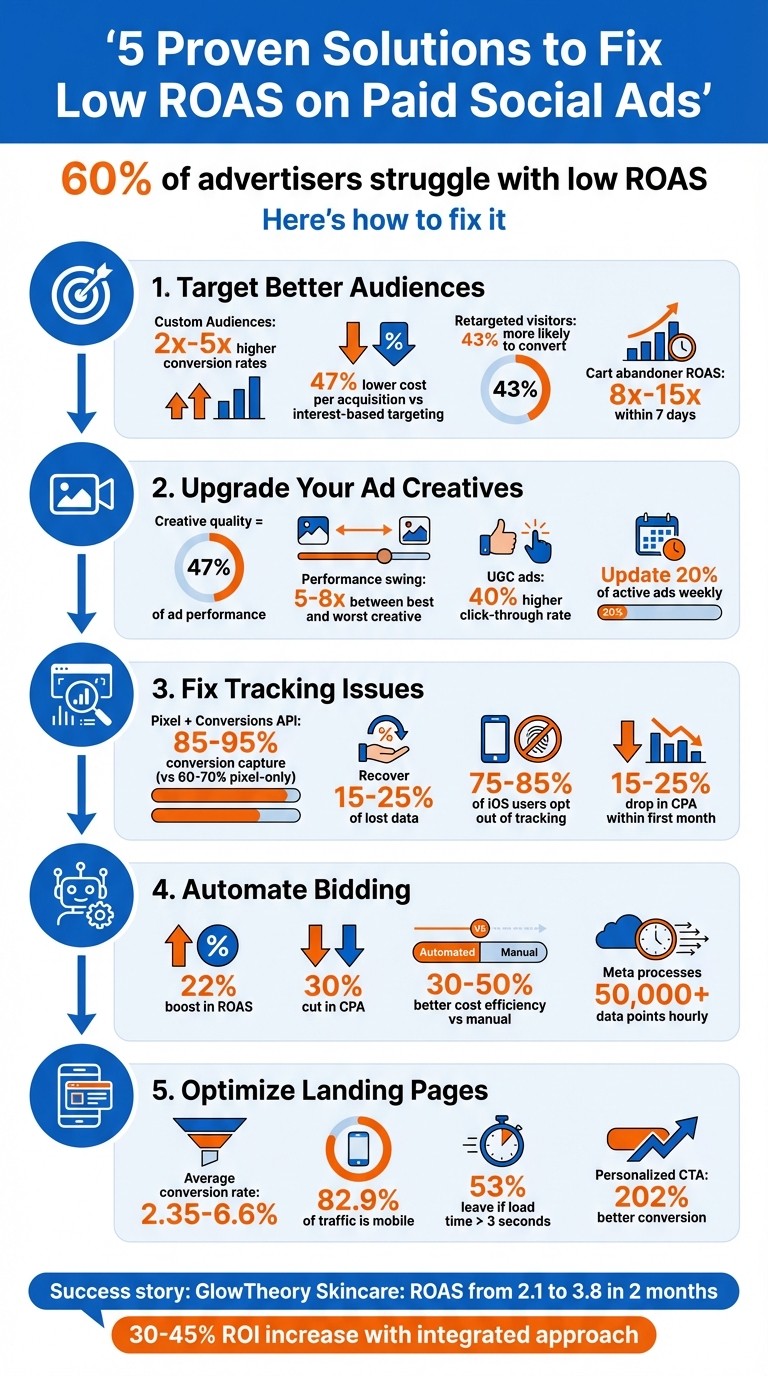
Struggling with low ROAS on paid social ads? You're not alone - 60% of advertisers face this issue. The good news is there are five proven ways to fix it:
Target better audiences: Use Custom and Lookalike Audiences, retarget site visitors, and refine by location and device.
Upgrade your ad creatives: Test new visuals regularly and include user-generated content with strong calls-to-action.
Fix tracking issues: Combine Meta Pixel with Conversions API to recover 15-25% of lost data.
Automate bidding: Use rules to pause, scale, or adjust ad sets based on performance.
Optimize landing pages: Speed up load times, ensure mobile-friendliness, and align pages with your ads.
Solution 1: Improve Your Audience Targeting
Showing ads to the wrong audience can drain your budget and hurt your return on ad spend (ROAS). Custom Audiences based on your customer lists can deliver conversion rates 2x to 5x higher than standard targeting because they focus on users already familiar with your brand.
Use Lookalike and Custom Audiences
Start by segmenting your customer list by lifetime value. Create a "Super-Seed" audience using only the top 20% of your customers based on their spending. Campaigns with well-structured Custom Audiences often see a 47% lower cost per acquisition compared to interest-based targeting alone. To boost match rates, include multiple identifiers like email, phone, name, and location.
When it comes to Lookalike Audiences, test different tiers. A 1% Lookalike works best for high-ticket or niche products, while 3-5% Lookalikes are better for scaling campaigns that are already performing well. Update your customer list seeds at least once a month - or weekly if you're dealing with a high volume of sales - to ensure the algorithm stays aligned with current customer behavior. Also, use Meta's Audience Overlap tool to prevent your Lookalike Audiences from competing against each other, which can drive up costs.
An overlooked strategy is building Custom Audiences from video viewers. Create an audience of users who have watched 75% or 95% of your video ads. This group is often 5-10x larger than website-based audiences and avoids iOS tracking challenges since it relies on Meta's on-platform data.
After setting up these audiences, refine your targeting by re-engaging past site visitors.
Set Up Retargeting Campaigns
Retargeting helps you reconnect with the 96-98% of visitors who leave your site without making a purchase. Retargeted website visitors are 43% more likely to convert compared to cold audiences. The key is segmenting by user behavior and timing.
Break your audiences into funnel stages: all site visitors, product viewers, cart abandoners, and past buyers. Then, segment further by recency. For example:
Users who visited 1-7 days ago may respond well to urgency-driven offers.
Visitors from 30-60 days ago might engage better with brand stories or social proof.
Retargeting cart abandoners within 7 days can yield ROAS as high as 8x to 15x.
Exclude recent purchasers (within the last 30 days) from prospecting campaigns to avoid wasting ad spend on those who have already converted. Limit impressions to 3-5 per user over 7 days and refresh creatives every 10-14 days to avoid ad fatigue and sustain conversions. Dynamic Product Ads are especially effective here, as they automatically showcase the exact items users browsed.
Target by Location and Device
In addition to audience segmentation, fine-tuning geographic and device targeting can help cut unnecessary spending. The default "living in or recently in" location setting includes residents, commuters, and even travelers who passed through the area. For local service businesses, this can waste budget on irrelevant users.
Meta's internal tests found a 6.7% lower cost per optimized event when using location expansion, but this feature is better suited for e-commerce brands than local businesses. If you need precise geographic control, disable the "Reach more people likely to respond to your ads" option and use specific postal codes or smaller custom radii. Use the "Breakdown → Geography" tool in Ads Manager to analyze where your budget is being spent - it’s more reliable than relying on ad comments.
For device targeting, keep in mind that IP geolocation accuracy varies: it’s 99.8% accurate at the country level, about 80% at the state level, but only 66% at the city level. When running Lookalike Audiences, keep them country-specific to avoid diluting the algorithm’s effectiveness, as consumer behavior differs significantly by market.
Solution 2: Improve Your Ad Creatives
Did you know that creative quality accounts for 47% of ad performance variability? The gap between your best and worst-performing creative can swing your return on ad spend (ROAS) by as much as 5-8×. On top of that, sticking with the same assets for too long can drive up costs.
Creative fatigue typically sets in every 2-4 weeks, and ad accounts that test fewer than five new creatives per month often experience a 15% month-over-month increase in cost per acquisition (CPA). With your audience scrolling past hundreds of posts daily, ads they’ve already seen three times are likely to be ignored.
Test and Update Creatives Often
The best brands don’t wait for performance to drop - they’re constantly testing new ideas. In fact, top advertisers update 20% of their active ads weekly. This doesn’t mean starting from scratch each time; it’s about experimenting with new angles, formats, and hooks to keep your audience engaged.
Take ASRV, a premium athleticwear brand, as an example. In Q1 2024, they ramped up creative testing, comparing product-focused visuals with model-based ones. By adjusting their strategy based on these tests, they achieved impressive results: 60% more revenue, a 42% higher ROAS, 75% more purchases, and a 35% better CPA compared to 2023. Their secret? Speed. They didn’t wait for declining performance - they stayed ahead of it.
Here’s a smart approach: allocate 70-80% of your budget to proven winners while dedicating 20-30% to testing 4-6 creative variations. This kind of variety can lower CPA by 20-30%.
"Creative velocity is the speed at which a brand can produce, test, and iterate on new ad concepts. In 2026, this metric correlates more strongly with profitability than bidding strategies or audience targeting adjustments." - Koro
Tailor your creative updates to the platform. For example, TikTok ads benefit from frequent refreshes every few days, using 3-5 ad groups per campaign with 3-5 creatives in rotation. On Meta platforms, updating ads every 2-4 weeks helps sustain performance. Keep an eye on your Hook Rate (aim for over 30%) and Hold Rate (target above 15%) to measure success.
Verde Wellness, a supplements brand, faced a drop in engagement from 4% to 1.8% due to creative fatigue. By automating their testing process and producing 21 user-generated content (UGC)-style videos weekly, they stabilized their engagement rate at 4.2% while saving 15 hours of manual work each week.
Adding variety to your creatives becomes even more impactful when paired with user-generated content and testimonials.
Add User-Generated Content and Testimonials
Content created by real users or featuring authentic testimonials performs exceptionally well, delivering a 40% higher click-through rate compared to polished studio ads.
MOOD Innovations, a sexual health supplement brand, illustrates this perfectly. In July 2024, they partnered with Inflow to overhaul their Meta ads. By replacing aesthetic-focused ads with influencer-style videos featuring their founder, Layla Martin, they emphasized brand education and social proof. Within three days, they saw a 63% jump in ROAS. Over time, this strategy led to a 122% increase in total social ad ROAS and a staggering 341% boost in lower-funnel campaign ROAS.
The appeal of UGC lies in its relatability. Raw, unpolished content - think shaky cameras, casual settings, and natural delivery - feels like genuine social posts rather than ads. To make it work, avoid over-scripting. Instead, provide creators with bullet points and psychological hooks like "The Skeptic Angle." And since 85% of videos on Facebook and Instagram are watched without sound, include text overlays and captions. These can increase video watch time by up to 12%.
"The 'lo-fi' aesthetic signals authenticity, which is the currency of modern social commerce." - Koro UGC Guide
Leverage existing customer content by securing usage rights for quick campaign launches. Incorporating testimonials and reviews early on can further drive engagement.
Once you’ve nailed your visuals, the next step is ensuring your audience knows what to do next.
Write Clear Calls-to-Action
A strong call-to-action (CTA) is your final push to get users to act. Phrases like "Shop Now" or "Learn More" should be front and center. The first 2-3 seconds of a video or the main headline of an image are critical for grabbing attention, but your CTA is what converts that attention into action.
Make sure your CTAs are visible, even for sound-off viewers. Use bold visuals, bright colors, and clear contrast to guide the viewer’s eye naturally to your CTA. Communicate your value proposition within the first three seconds to combat short attention spans.
For prospecting campaigns, aim for a click-through rate above 1.0%, and for retargeting, shoot for 2.5% or higher. If your performance falls short, experiment with different button colors, placements, and wording to see what resonates best.
Solution 3: Fix Your Conversion Tracking
Even the best ad creatives won't save a campaign if your conversion tracking is off. Broken tracking doesn't just obscure results - it actively misguides Meta's algorithm. Accurate event data is the backbone of Meta's optimization process. Feeding it incomplete or redundant conversion signals leads to wasted spend, as the algorithm optimizes for the wrong audiences and scales underperforming campaigns.
For example, relying on pixel-only tracking captures just 60-70% of conversions. But when you pair the Meta Pixel with the Conversions API, that number jumps to 85-95%. The missing 15-25% isn’t just data - it’s lost revenue and wasted ads. Compounding the issue, 75-85% of iOS users now opt out of tracking, creating additional blind spots in attribution.
"Incomplete conversion data leads the AI to make poor decisions that hurt profitability." - AdStellar
The good news? Advertisers who implement server-side tracking with the Conversions API often see a 15-25% drop in cost per acquisition within the first month. This improvement happens because Meta’s algorithm finally gets the reliable data it needs to optimize effectively.
Configure Meta Events Manager
To fix your tracking, connect both the Meta Pixel (browser-side) and the Conversions API (server-side) in Meta Business Manager. Go to "All Tools" → "Events Manager" to set this up. This dual approach helps bypass privacy restrictions and ad blockers that prevent 30-40% of users from being tracked by the pixel alone.
Next, verify your domain through DNS, HTML file upload, or meta-tag. This unlocks Aggregated Event Measurement (AEM), letting you track up to eight prioritized conversion events - even for users who opt out of tracking. Place your highest-value event, like "Purchase", at the top of your priority list.
You can also enrich your events with additional parameters. For example, adding details like "value", "currency", and "content_ids" to events such as Purchase or Lead allows Meta to optimize for return on ad spend (ROAS) rather than just conversion volume. Including hashed customer data, like email addresses and phone numbers, further boosts your Event Match Quality (EMQ) score.
Deduplication is key to avoiding inflated metrics. When the same event fires from both the pixel and server, assign an identical event_id to both signals within a 48-hour window. Use the "Test Events" tool in Meta to confirm your signals are being received and deduplicated correctly. Reliable tracking ensures Meta’s algorithm optimizes bids with precision, improving your ROAS.
To stay ahead, check the Diagnostics tab weekly for errors like missing parameters or declining event volume. For example, one advertiser saw their EMQ drop to 4.5, forcing Meta to guess how to allocate 55% of their budget.
Event Match Quality (EMQ) Score | Performance Impact |
|---|---|
8.0+ (Excellent) | High confidence in attribution; optimal algorithmic learning |
6.0-7.9 (Good) | Reliable for most optimization decisions |
4.0-5.9 (Acceptable) | Significant data gaps; the algorithm may struggle to distinguish winners |
< 4.0 (Poor) | High risk of budget waste; optimization is largely based on guesswork |
Once your event tracking is solid, the next step is to refine your attribution data with UTM parameters.
Add UTM Parameters for Better Data
UTM parameters are essential for accurate attribution. They help you identify the exact campaign, ad set, and creative driving each click and conversion. This allows you to cross-check Meta’s reported data with your backend systems, like Shopify or your CRM.
For consistency, use lowercase UTM naming with hyphen separators (e.g., "2026-q1-audience-goal"). Avoid using UTM parameters on internal website links, as this can overwrite original campaign attribution. Otherwise, it might look like users came from your website’s menu instead of your paid ads.
"If 20% of your campaign links are mistagged, 20% of your attribution data is wrong - and you will never see an error message." - KISSmetrics Editorial
Run monthly audits to ensure evergreen content tags haven’t decayed and that your team follows the same naming conventions.
Fix iOS Attribution Problems
Apple's App Tracking Transparency framework has created significant attribution gaps. For e-commerce campaigns, underreporting ranges from 20-40%, and for lead generation efforts, it’s even higher - 30-50%.
To address this, use a layered approach. The Conversions API is critical here, as it bypasses browser-side restrictions by sending conversion data directly from your server to Meta. This can recover 15-40% of data lost to privacy restrictions. Tools like Stape or Elevar can simplify the technical setup, with costs ranging from $50 to $500 per month, depending on your event volume.
Configure Aggregated Event Measurement to prioritize your eight most important conversion events. This ensures you capture at least some data from iOS users who opt out, though it will be aggregated. Pair this with improved Event Match Quality by passing hashed customer data, especially emails and phone numbers. Emails tend to be the most effective identifier, followed by phone numbers.
"In 2026, running Meta Ads without CAPI is like driving with one eye closed - you’re missing critical information that affects every optimization decision you make." - Benly
Meta’s algorithm needs around 50 conversions per week per ad set to exit the learning phase. If your tracking only captures 60% of real conversions, the algorithm can’t optimize properly. Fixing your tracking infrastructure ensures Meta gets the data it needs to make smarter decisions - and that means better results for your campaigns.
Solution 4: Automate Your Bid Adjustments
Manual bid management simply can’t keep up with Meta’s algorithm, which processes over 50,000 data points and updates hourly. By 2026, the gap between automated and manual accounts is expected to grow, with automation delivering 30-50% better cost efficiency. Advertisers who made the switch to automated bidding have seen an average 22% boost in ROAS and a 30% cut in CPA.
Automation takes care of repetitive tasks - like pausing underperforming ads, scaling successful ones, and adjusting bids in real time - so you can focus on higher-level strategy. The trick is setting up the right rules and priorities.
Create Automated Rules for Ad Performance
Start with kill rules to pause ad sets that overspend without delivering results. For instance, if your target CPA is $50, set a rule to pause any ad set spending $100-$150 without conversions. These rules should run every 30-60 minutes.
Next, implement scaling rules for your top-performing ads. For example, increase the budget by 15-20% for any ad set that maintains a ROAS above 3.0 over seven days and spends at least $100. Keep increases to 20% or less to avoid disrupting Meta’s learning phase. Run these checks once daily for stability.
To prevent conflicting actions, establish a rule hierarchy: prioritize budget protection rules first, followed by performance kill rules, then alert rules, and finally scaling rules. This ensures one rule doesn’t try to scale an ad while another pauses it.
During the first 1-2 weeks, set rules to “Send Notification Only” so you can test their accuracy without risking your budget. Use consistent timeframes for your rules: 24-hour windows for budget protection, 3-day windows for testing, and 7-day windows for scaling.
Rule Type | Recommended Condition | Action | Check Frequency |
|---|---|---|---|
Kill Rule | Spend > 2x Target CPA AND 0 Conversions | Pause Ad Set | Every 30-60 mins |
Scale Rule | ROAS > 3.0 AND Spend > $100 (Last 7 Days) | Increase Budget 15% | Once Daily |
CPA Guard | CPA > 3x Target (Last 7 Days) | Reduce Budget 50% | Once Daily |
Fatigue Alert | Frequency > 4.0 | Send Notification | Every 6 hours |
Adjust Bids by Device and Location
Meta’s Value Rules let you fine-tune bids for specific audience segments - like age, gender, location, or device - without disrupting AI optimization. You can adjust bids up to 1,000% higher or 90% lower for different groups.
For example, Laura Geller Beauty used Value Rules to focus on high-LTV segments. They increased bids by 40% for women aged 25-34 and 30% for those aged 35-44, while reducing bids by 30-50% for older audiences. This strategy led to a 46% increase in ROAS without increasing their total ad spend.
On the other hand, music promoter Brian Hazard faced a different issue: 70% of his budget targeted low-converting leads in Brazil and Mexico. By cutting bids for these regions by 40%, he redirected 60% of traffic to U.S. leads, which converted at five times the rate. This adjustment improved lead quality by 4x.
Start by lowering bids for underperformers instead of raising bids for winners. This frees up budget for Meta’s algorithm to reallocate naturally, avoiding inflated CPMs. When creating Value Rules, always list the most specific criteria first - Meta only applies the first matching rule.
Give new Value Rules 7-14 days to settle before evaluating their impact, as changes typically trigger a new learning phase. Brands that optimized for conversion value rather than volume saw a 12% average ROAS improvement in 2026 benchmarks.
"Value Rules amplify your assumptions. If your data is wrong, you're paying Meta to make worse decisions." - 1ClickReport
Use Real-Time Data for Bid Changes
Modern AI bidding relies on over 1,000 signals to predict profitable conversions, adjusting bids proactively rather than reactively. This system operates at a speed and scale manual management can’t match.
Focus on four key metrics for automated bid adjustments:
CPA for kill rules
ROAS for scaling
CTR as an early indicator of creative-audience fit
Frequency to track audience fatigue
Set alerts when frequency exceeds 4.0 to catch potential issues before performance drops. Avoid reacting to small data sets - wait for 5-10 conversions per ad set before making bid changes. This helps you base decisions on patterns rather than random fluctuations.
Always set maximum budget caps on scaling rules to prevent overspending. Review rule triggers weekly and compare automated performance with previous manual results monthly.
Tools like Bigeye’s analytics simplify this process by offering real-time insights, helping you spot trends and fine-tune rules as conditions change. Automation isn’t about removing human oversight - it’s about freeing you to focus on strategy while the system handles the repetitive tasks.
"The advertisers winning in 2026 aren't working harder - they're automating smarter." - AdBid
Next, refine your landing pages to complete your ROAS optimization strategy.
Solution 5: Fix Your Landing Pages
Even the best ads won't succeed if your landing page doesn't deliver. The average landing page conversion rate ranges between 2.35% and 6.6%, and the difference between a poorly performing page and an optimized one can mean 2-5x higher conversions. That directly impacts your CPA (Cost Per Action) and ROAS (Return on Ad Spend).
Here's the kicker: 82.9% of landing page traffic comes from mobile users, yet many pages are still designed with desktop users in mind. Add to this the fact that Gen Z users take just 1.3 seconds to decide whether to engage with your content, and you’ve got a clear mandate: your page needs to load fast and guide users toward a single, clear action. Optimization starts with speed and mobile readiness.
Make Pages Fast and Mobile-Friendly
Speed is everything when it comes to landing pages. If your page takes more than 3 seconds to load, 53% of mobile users will leave. Even worse, increasing load time from 1 to 5 seconds spikes bounce rates by 90%.
To speed things up, start by compressing images. Use the WebP format and keep file sizes under 200KB. Implement lazy loading, so images and videos only load as users scroll. Also, remove unnecessary tracking pixels and third-party scripts that slow things down.
For mobile-first design, focus on vertical layouts with large, easy-to-tap buttons - aim for 44-48px for interactive elements. Use specific HTML input types, like email or numeric, to trigger the right mobile keyboards. Avoid annoying pop-ups that are hard to close on small screens, and ditch sticky headers that eat up valuable space.
Once your page loads quickly and works smoothly on mobile, the next step is building trust and clarity.
Add Trust Signals and Clear Copy
A fast-loading page is great, but it won't convert if users don't trust it or can’t quickly grasp its purpose. Add customer testimonials (with real names and photos), industry certifications, or trust seals near your call-to-action (CTA). Your headline is crucial too - it should mirror the promise in your ad. For example, if your ad says "Get 50% Off", that exact phrase should appear prominently above the fold. This "message match" eliminates confusion and keeps users engaged.
Swap vague CTAs like "Submit" for action-oriented phrases like "Get My Free Quote" or "Start My 7-Day Trial." Personalization matters - a personalized CTA converts 202% better than a generic one. Keep forms short and sweet. Adding a phone number field can lower conversions by 5-15%, and forms with more than 8 fields can see a 30%+ drop in conversion rates.
Match Landing Pages to Your Ads
Consistency is key. Your landing page should visually and emotionally align with your ad. Use the same colors, imagery, and tone. If your ad highlights a specific product or offer, make that the focus of your landing page - not something hidden below the fold.
Remove distractions like top navigation menus or external links. High-converting pages focus on one primary goal, ensuring users stay on track toward the desired action.
Lastly, take advantage of UTM parameters to dynamically adjust your landing page headlines to match the ad. For instance, if someone clicks on an ad for "Enterprise Solutions", the landing page should immediately address enterprise-specific needs rather than offering generic information.
Conclusion: How to Get Better ROAS
Boosting your ROAS isn’t about finding a magic bullet - it’s about combining strategies that complement each other. Even the most precise audience targeting won’t deliver results if your ads feel outdated, your landing pages are slow, or your tracking isn’t accurate.
Take GlowTheory Skincare, for example. They saw their ROAS climb from 2.1 to 3.8 in just two months by treating these strategies as a connected system rather than isolated fixes.
Here’s the blueprint: start with accurate tracking. Real data is the foundation for smarter decisions. Then, refine your approach with better targeting, fresh, engaging creatives, and landing pages designed to convert. Brands adopting this integrated method often report ROI increases of 30-45% compared to traditional approaches. The secret lies in creating a feedback loop where performance data shapes your creative direction, and creative testing sharpens your targeting.
If you’re unsure where to begin, focus on your weakest links - maybe it’s ad fatigue or a clunky mobile experience. Tackle those first, then expand your efforts. It’s about steady improvement, not instant perfection.
If your paid social ROAS has slipped and you can't tell whether it's tracking, creative or targeting, talk to Bigeye. Our paid media team can audit the account with you and show you which fix to make first.
FAQs
Which fix should I try first to improve ROAS?
To improve your ad performance, begin by fine-tuning your audience targeting and bidding strategies. This involves refining your keyword selection, tweaking bid amounts, and pinpointing the right audience segments and platforms for your ads.
You can also take advantage of AI-powered targeting tools to analyze data and make smarter decisions. Pair this with real-time adjustments to your campaigns, allowing you to respond quickly to performance trends and market shifts.
By focusing on these core strategies first, you'll create a strong foundation for boosting your return on ad spend (ROAS) before diving into more advanced techniques.
How do I know if my Meta tracking is broken?
If you're unsure whether your Meta tracking is working properly, start by examining your conversion tracking setup. Make sure your pixels or Conversions API are operating as they should and that conversions are being attributed accurately.
Here are some warning signs to look out for:
Your ROAS (Return on Ad Spend) doesn't match expectations.
Conversions are missing or not showing up in reports.
Data in your ad manager seems inconsistent or unreliable.
It's a good idea to review your tracking setup regularly, especially after major updates like iOS 14.5, which introduced changes that could impact tracking. Catching and fixing discrepancies early can save you from bigger issues down the line.
What ROAS is “good” for my business?
A "good" ROAS can vary widely depending on your industry and the platform you're using. For instance, in 2025, the median ROAS for ecommerce was approximately 2.87x. Comparatively, industries like automotive saw an average ROAS of 2.54x on Meta, while sectors like media and publishing often faced challenges, with averages as low as 1.17x. These benchmarks highlight the importance of factoring in your specific niche and business objectives when assessing performance.
Related from Bigeye
Case study: Flex

CPG Marketing
Oct 4, 2026
A CPG marketing strategy for 2027 in eight steps, with Bigeye shopper research and current data on private label, retail media, creators and AI search.