
Meta Ads’ geographic targeting lets you focus ad delivery based on user locations, from country-level to a 1-mile radius. This approach ensures your ads reach the right audience, saving budget and boosting conversions. For U.S. advertisers, advanced options like ZIP codes, DMAs, and congressional districts allow for even greater precision. Key benefits include:
Targeted Reach: Focus on areas relevant to your business, such as affluent neighborhoods or regions with high homeownership rates.
Improved ROI: Avoid wasted impressions by excluding non-serviceable areas or low-performing regions.
Localized Messaging: Tailor ads with city-specific references or audience-specific creatives for better engagement.
Geo-targeting is essential for businesses aiming to align campaigns with market strategies, drive offline purchases, and optimize ad spend. Whether you’re a local gym, e-commerce brand, or B2B company, this guide breaks down the steps to plan, execute, and refine your geographic targeting strategy effectively.
Planning Your Geographic Targeting Strategy
Setting Campaign Objectives and KPIs
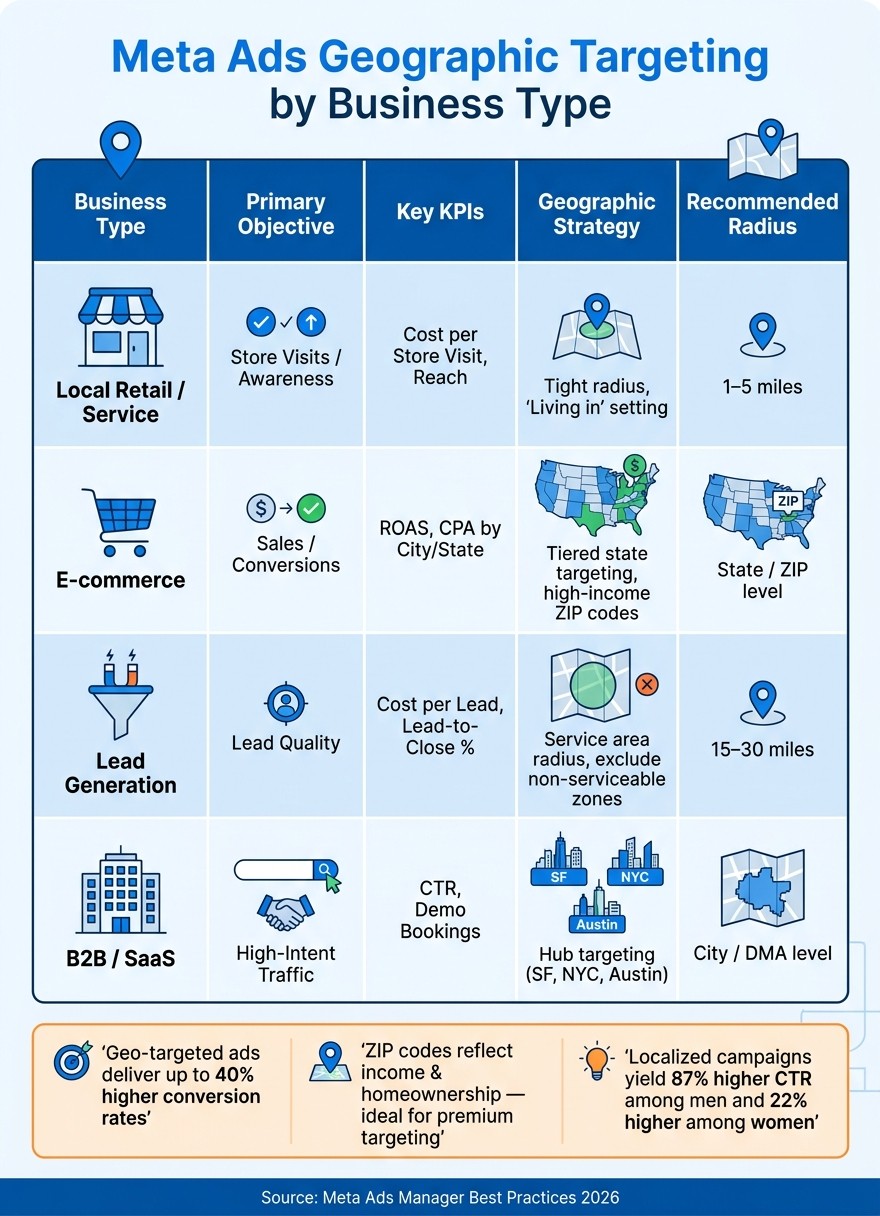
Before diving into Ads Manager settings, take a step back and define your campaign goals and target regions. The approach you take will vary greatly depending on your business type. For instance, a local gym might focus on a small radius around its location with KPIs tied to store visits. On the other hand, a national e-commerce brand might aim for state-level targeting with benchmarks like ROAS (Return on Ad Spend) and CPA (Cost Per Acquisition). Meanwhile, a B2B company could zero in on business hubs such as San Francisco, New York City, or Austin.
Choose a Meta campaign objective - whether it’s Sales, Leads, Traffic, or Brand Awareness - to help the algorithm optimize within your chosen geography. Align your KPIs with these objectives: ROAS by city/state for e-commerce, Cost Per Lead (CPL) by region for lead generation, or Cost Per Store Visit for brick-and-mortar businesses. To maximize efficiency, group your target locations into Tier 1 (proven markets) and Tier 2 (growth opportunities), setting unique performance benchmarks for each. This is especially important since CPM costs can vary widely across different regions.
Business Type | Primary Objective | Key KPIs | Geographic Strategy |
|---|---|---|---|
Local Retail/Service | Store Visits / Awareness | Cost per Store Visit, Reach | Tight radius (1-5 miles), ZIP-level exclusions |
E-commerce | Sales / Conversions | ROAS, CPA by City/State | Tiered state targeting, high-income ZIP codes |
Lead Generation | Lead Quality | Cost per Lead, Lead-to-Close % | Service area radius, exclusion of non-serviceable zones |
B2B / SaaS | High-Intent Traffic | CTR, Demo Bookings | Hub targeting (e.g., SF, NYC, Austin) |
Once you’ve clarified your objectives, analyze your current and potential markets to refine your strategy further.
Analyzing Current and Potential Markets
Your own data is the best place to start. Dig into CRM records, shipping data, and website analytics to identify where your customers are concentrated. Often, national averages can mask regional strengths. For example, a brand might see a 2.0 ROAS across the U.S. but achieve a 4.5 ROAS in a city like Miami. Isolating these high-performing areas into dedicated campaigns can quickly boost overall results.
Next, use Meta Audience Insights to explore untapped markets. In the U.S., ZIP codes can be incredibly useful for segmentation - they often reflect income levels and homeownership rates, which are crucial if you’re selling premium or high-ticket items. Group locations with shared characteristics, such as university towns or retirement communities, to simplify ad set management. This approach also allows for more tailored creative without the headache of managing dozens of separate campaigns.
These insights will help you allocate your budget more effectively across different market tiers.
Allocating Budgets by Geography
To avoid wasting budget, separate high-CPM markets (like the U.S.) from lower-cost international markets in distinct ad sets. If you lump them together, Meta’s algorithm will prioritize cheaper impressions, which could mean your U.S. audience barely sees your ads. Running separate campaigns ensures better delivery optimization.
Divide your budget into three tiers: primary (proven markets), secondary (markets showing early promise), and exploratory (new testing areas). Allocate around 60-70% of your budget to primary markets, while reserving smaller portions for testing and growth opportunities. It also helps to hold a small reserve for mid-year adjustments based on performance data. For e-commerce brands, excluding regions like Alaska and Hawaii can help maintain a strong ROAS.
Configuring Geographic Settings in Meta Ads
Choosing Location Types and Inclusion Rules
Geographic targeting in Meta Ads is set up at the Ad Set level within Ads Manager, under the Audience section. Here, you can type in a city, state, ZIP code, or country into the search bar. Alternatively, use the "Browse" option to explore predefined location lists like Countries, Regions, or Saved Locations.
For more precise targeting, the "Drop Pin" feature lets you pinpoint a location on the map and set a radius anywhere between 1 mile and 50 miles. Once you've selected your target areas, you can use the Exclude option (accessible via the arrow next to the search box) to block certain ZIP codes, cities, or regions. This exclusion feature is particularly helpful for e-commerce brands that face challenges shipping to remote locations.
These tools allow you to align your ad delivery with your regional strategy, ensuring your campaigns reach the right audience.
Geographic Level | Best Use Case |
|---|---|
Country/State | National e-commerce, brand awareness campaigns |
DMA (Designated Market Area) | Aligning digital spend with TV/radio buys (U.S. only) |
City/Radius | Driving foot traffic to stores, testing local preferences |
ZIP Code | High-precision targeting, income-based segmentation |
Using Meta's Location Presence Options
As of 2026, Meta simplified its location presence settings. Previously, advertisers could choose from four options: Living in, Recently in, Traveling in, or a combined setting. Now, only "Living in or recently in this location" is available. Meta's algorithm automatically determines whether someone is a resident or visitor using data like GPS, IP addresses, and profile information.
This change is especially relevant for local service businesses. Since manual filtering of tourists or commuters is no longer an option, you’ll need to adjust your ad creative to qualify your audience. For example, headlines like "Serving [City Name] Homeowners Since 2010" naturally attract the right people. For hyper-local services, such as plumbing or HVAC, targeting specific ZIP codes instead of entire cities can help minimize wasted impressions caused by the "recently in" component.
With these streamlined settings, you can still refine your targeting further by layering additional audience filters.
Combining Geographic Filters with Audience Targeting
Combining geo-targeting with interest, demographic, or behavioral filters can make your campaigns more effective. However, narrowing your audience too much can backfire. For instance, when targeting a tight geographic area like a 1-mile radius, keep other filters broader to maintain a large enough audience for Meta's algorithm to work efficiently.
A smart strategy: match ZIP code targeting with income or homeownership signals for premium products, or combine a city-level radius with interest categories for local services. For example, a contractor offering home renovation services could target homeowners within a 10-mile radius of a specific suburb. Always check your estimated audience size in Ads Manager before launching your campaign. If the audience is too small, loosen one of your filters without compromising on the geographic area.
Targeting Combination | Best For |
|---|---|
Location + Income/Homeownership | High-ticket or luxury products |
Location + Interest + Behavior | Local service businesses |
Location + Life Events + Demographics | Event-driven offers like weddings or moves |
Advanced Geographic Targeting Techniques
Hyper-Local and Store-Level Campaigns
Once you've set up your basic geo-targeting, fine-tune your radius to align with how far customers are likely to travel. For example, restaurants typically see success with a 3-10 mile radius, retail stores with 5-15 miles, and home services like HVAC or plumbing often work best within 15-30 miles.
A handy tactic here is the exclusion strategy, sometimes called "Swiss Cheese" targeting. This involves targeting a broad area, such as a metro region or entire state, but excluding specific ZIP codes where you don't operate or where competition is too fierce. This way, you maintain a wide reach while avoiding wasted budget in areas that are less likely to convert.
Meta's Advantage+ targeting also brings a unique twist to radius settings: it no longer treats a 5-mile radius as a hard wall, but as a preference signal.
This means your ads might reach slightly beyond your defined area, so your ad copy becomes critical for filtering your audience. Including neighborhood-specific phrases like "Serving Lincoln Park homeowners" or "Now open in Wicker Park" can help attract the right clicks while discouraging irrelevant ones.
Once you've mastered these localized tactics, you're ready to explore new markets with even more precision.
Testing New Markets and Expanding Geographically
When entering new markets, start with broad campaigns and narrow them down as performance data rolls in. Look at results by city or ZIP code to identify high-performing pockets, then create dedicated ad sets for these areas and allocate more budget to them.
Using 1% Lookalike Audiences based on your best customers is another efficient way to break into new markets.
Another useful approach is grouping locations by economic tiers. This prevents overspending on low-performing areas while ensuring higher-value regions get the attention they deserve. These strategies ensure every dollar is spent with purpose, maximizing returns across geographic segments.
Tailoring Messaging by Geography
Once your markets are defined, it's time to tailor your messaging to fit local preferences. Adjusting your creative assets for specific locations can make a big difference.
Consider adding city-specific references to your headlines or visuals. You can also take it a step further with weather-triggered ads. For instance, use third-party APIs to automatically launch HVAC repair ads when temperatures rise above 90°F or promote outerwear when they drop below 30°F.
For brands with multilingual audiences, micro-targeting by language can significantly boost engagement. For example, creating Spanish-language ads for areas like Miami, Los Angeles, or Texas can resonate deeply with local audiences. Pairing ZIP code targeting with Meta's catalog system allows you to serve localized creative automatically, avoiding the need to create numerous ad sets.
Targeting Strategy | Best For | Creative Adjustment |
|---|---|---|
Radius Targeting | Brick-and-mortar (gyms, cafes) | Highlight proximity (e.g., "Just 2 miles away") |
ZIP Code Targeting | High-income or luxury products | Use visuals reflecting affluent neighborhoods |
DMA Targeting | Aligning with TV/radio spend | Match messaging from local broadcast ads |
Behavioral Layering | Home services (HVAC, plumbing) | Target new homeowners with "Welcome" offers |
Fine-tuning your creative and targeting in this way ensures your ads resonate with the right audience, driving better results across all your campaigns.
Measuring and Optimizing Geographic Performance
Tracking Key Metrics by Location
Meta Ads Manager simplifies the process of analyzing performance by location. Start by using the Breakdown menu, selecting "Delivery", and then segmenting your data by Country, Region (State), DMA (Designated Market Area), or City. After that, customize the columns to focus on essential metrics like CTR, CPM, CPA, and ROAS.
For a more in-depth look, combine this with location-specific UTM parameters. This allows third-party analytics tools to track post-click actions, giving you data-driven growth insights beyond just impressions. This method is particularly helpful when assessing how conversion behavior varies across cities or states, where customer intent might differ.
Metric | What It Tells You | Action to Take |
|---|---|---|
Cost per Result | Identifies locations with the best ROI | Allocate more budget to high-performing regions |
CTR | Measures ad relevance in each area | Update creative for regions with low engagement or use AI-driven ad creative to personalize content at scale |
Frequency | Checks for audience saturation | Broaden targeting or rotate creative to avoid fatigue |
Reach % | Evaluates market penetration locally | Adjust budgets to improve coverage |
These metrics provide a solid foundation for understanding and addressing differences in regional performance.
Diagnosing Performance Differences by Region
If a region isn't performing well, several factors could be at play. One common issue is "location creep" - ads unintentionally reaching unintended areas because the "Living in or recently in" setting includes commuters or travelers. Additionally, IP inaccuracies and VPN use can reduce geolocation precision, with city-level accuracy being about 66% within a 50-kilometer radius.
Another challenge arises when markets with vastly different economic conditions are grouped together in a single ad set. If you put the USA and India in the same ad set, Meta will likely spend most of the budget on India because CPMs are cheaper, starving your US audience.
For campaigns using Advantage+ Audience, remember that location and minimum age settings are treated as strict rules. However, Meta may override gender, maximum age, and interest targeting to secure cheaper conversions.
Adjusting and Scaling Budgets by Location
Once you’ve identified the root causes of performance issues, adjust your budget allocations accordingly. Separate high-performing regions into their own campaigns to prevent them from competing for budget with lower-performing areas. This strategy provides the algorithm with clearer signals and enables you to scale effectively.
When increasing budgets, do so gradually - around 10-20% increments - to avoid resetting the learning phase. Keep in mind that stabilizing the learning phase typically requires about 50 optimization events per week. Set a consistent review schedule every 2-4 weeks to identify long-term trends and avoid overreacting to short-term fluctuations. This steady approach ensures your geographic strategy is based on reliable patterns rather than temporary changes.
Key Takeaways for Geographic Targeting in Meta Ads
Getting geographic targeting right in Meta ads starts with a few critical choices before your campaign even goes live. One of the most important is drawing your locations tightly enough that Meta's "Living in or recently in" setting still reaches the actual residents who are most likely to convert.
Details matter. For example, using ZIP codes can help you tap into income-level signals, while Designated Market Areas (DMAs) align your ads with broader media strategies. For businesses with physical locations, radius targeting works well, offering precision down to a 1-mile radius. These settings are the foundation for better performance.
Geo-targeted ads can deliver up to 40% higher conversion rates compared to non-targeted campaigns. But that kind of success only happens when your targeting is both geographically and contextually relevant. Incorporating local references - like landmarks, neighborhood names, or regional details - into your ad creative makes it more relatable and impactful.
"Facebook geo targeting isn't a back-end tweak. It decides whether your ad budget converts or disappears." - The Scale Performance
To make the most of geographic targeting, it’s not a “set it and forget it” strategy. Continuously refine your approach by separating high-performing regions into their own campaigns, excluding areas that don’t generate profitable results, and regularly analyzing location-level data. The best-performing brands treat location targeting as a dynamic signal that evolves with their campaign.
If your Meta budget is leaking into places that never convert, talk to Bigeye. Our paid media team can read your location data, split the markets that deserve their own budget and cut the ones that don’t.
FAQs
Should I use radius, ZIP code, or DMA targeting?
When deciding between radius, ZIP code, or DMA targeting in Meta Ads, it all comes down to what you want to achieve with your campaign.
Radius targeting is perfect for super-local campaigns, like driving foot traffic to a store or promoting a nearby event.
ZIP code targeting suits promotions aimed at specific neighborhoods or localized areas.
If you’re looking to reach a broader audience, DMA targeting focuses on larger regional markets.
Choose the method that best matches your goals and the level of audience precision you're aiming for.
How do I stop ads from showing outside my target area?
To keep your ads focused on the right audience in Meta Ads Manager, take advantage of the location exclusion settings. Here's how: head to the Audience section within your ad set. From there, choose your target locations and exclude specific areas like ZIP codes or neighborhoods that don't align with your goals. You can also apply radius targeting around specific addresses and exclude areas within that radius as needed. This approach helps ensure your ads are seen by the right people, minimizing wasted ad spend.
When should I split locations into separate campaigns?
When targeting specific geographic areas or crafting messages for different regions, splitting locations into separate campaigns can be a game-changer. This approach allows you to fine-tune ad spend, boost relevance, and manage budgets and creatives more effectively for each location. It's particularly beneficial for hyper-local businesses, campaigns with distinct goals or offers, or when you need to exclude underperforming areas to concentrate on those delivering the best results.
Related from Bigeye
Case study: The Joint Chiropractic

Paid Media & Performance
Oct 7, 2026
A retail media strategy for 2027 in eight steps, with Bigeye shopper research and current data on Amazon, Walmart, Instacart and measurement.