Amazon sales for outdoor gear often slip for one simple reason: the listing does not answer the buyer’s main question fast enough. Mobile shoppers skim titles, judge images in seconds, and lean on reviews before they dig deeper. In this piece, I break down what matters most if I want more clicks, more conversions, and more repeat orders from outdoor buyers on Amazon in 2026.
In Bigeye's Calculated Traveler briefing, 45% of travelers took shorter trips and 59% cut daily spending to protect the trip itself. Gear that earns its place in the bag wins.
TL;DR
I get better Amazon sales for outdoor gear when I match listings to high-intent search terms, not broad traffic alone.
I win more clicks on mobile when titles, images, and bullets surface specs like weight, size, waterproofing, and setup time early.
I protect rank and margin when pricing, deals, and inventory are timed around seasonal demand instead of last-minute pushes.
I improve conversion when I use reviews, video, and ad structure to answer buyer doubts before they leave the page.
How Do Outdoor Shoppers Actually Search and Compare Products on Amazon?
Outdoor shoppers on Amazon don’t usually wander in just to browse. They come in with a job to do. Searches like “lightweight backpacking tent” or “kayak with dry storage” show clear intent, and each query points to a different kind of buyer with a different checklist. These shoppers tend to buy earlier in the process, compare more options, and react well to bundles and plain value statements.
More than 70% of Amazon shoppers browse on mobile, where search results often show only the first 70-80 characters of a product title. That changes how people compare products. They move fast, scan hard, and make snap calls. Amazon’s AI shopping answers now help them compare specs across multiple ASINs and skim review snippets for sentiment. For technical outdoor gear, the short list usually comes down to durability, weight, waterproofing, capacity, and bear canister compliance. If your copy is vague, shoppers can’t tell who the product is for, what season it fits, or whether it matches their skill level.
After you map how outdoor shoppers search, use ABA to find the queries that lead to purchases.
Use Amazon Brand Analytics to Find High-Intent Outdoor Search Terms

Amazon Brand Analytics (ABA) helps you spot the search terms that drive purchases in your outdoor category. That’s the part that matters. Impressions alone can look nice on a report, but clicks and conversions show buyer intent. The Search Query Performance (SQP) report lays out the funnel from impressions to purchases for your brand’s queries.
Focus on purchases, not just search volume. “Ultralight backpacking tent” may pull less traffic than “camping tent,” but if your product already converts on that term, that’s where your listing work and ad spend should go. As Ash Metry, Founder & CEO of Keywords.am, put it:
"Volume is noise without conversion context."
The pattern inside ABA can tell you where the listing breaks. High impressions with low CTR usually point to a title or main image issue. Strong clicks with weak cart adds often mean the problem sits in pricing, bullets, or A+ Content. Outdoor niches can move fast, too. Some terms have posted 30-day search growth up to 305%, often with less competition than broad category phrases.
The Market Basket Analysis report adds another layer. It shows what shoppers buy with your product. If a tent is often bought with a certain heater, that’s more than a fun data point. It suggests cold-weather use, which should show up in your listing copy and may even point to a bundle play.
Once you know which searches convert, group them by use case so the listing speaks to the trip, the season, and the buyer’s skill level.
Segment Shoppers by Outdoor Use Case and Buying Intent
The same keyword can mean different things depending on the trip. That’s why it helps to segment by use case, not just by search term. A family camper and a backpacker may both search for a tent, but they are not shopping the same way. Family campers care about easy setup, room, and comfort. Backpackers care about low weight, packed size, and gear that can hold up on the trail.
Shopper Segment | Primary Needs | Key Listing Element |
|---|---|---|
Family/Car Campers | Capacity, ease of setup, comfort | Lifestyle storytelling, how-to A+ Content |
Backpackers/Hikers | Weight, durability, technical specs | Spec tables, comparison charts |
Tech Buyers | Battery life, IP ratings, connectivity | Interactive A+, spec-heavy bullets |
Budget Buyers | Price, portability, multi-use | Bundles, value framing under $50 |
This split should shape more than the copy. It should guide which keywords you target, how you build A+ Content, and which images lead the page. A backpacker shopping for bear canister compliant gear needs to see that callout in the title or first bullet, not hidden lower on the page. A family camper is more likely to respond to easy-pitch signals and lifestyle-led imagery right away.
ABA’s Demographics report helps check whether your listing is aimed at the right person. If your buyers skew older or have higher household income than your page assumes, that gap can hurt conversion. The fix is simple in theory, though not always in practice: match the page to the buyer who is actually purchasing, not the one your team imagined. Those buyer segments should shape the titles, bullets, images, and A+ Content in the next section.
How to Optimize Outdoor Gear Listings for Higher Amazon Conversion Rates
Outdoor gear listings need to be easy to scan on mobile. Family campers, backpackers, and tech buyers don’t shop the same way, so they don’t look for the same details first. Use the shopper segments above to decide which specs should lead each title and bullet, so the most useful info shows up before the listing gets cut off on a phone screen.
Write Product Titles and Bullet Points Around Specs and Use Cases
For outdoor gear, the title structure is simple: Brand → Primary Keyword → Key Differentiator → Size or Variant. That order puts the brand, use case, and main specs up front before the title truncates on mobile.
In bullets, lead with the benefit first, then back it up with proof. For a backpack, that might look like: STAYS WARM - insulation rated for cold-weather backpacking. For tents, call out packed weight in pounds and peak height in inches right away. For tech gear like GPS watches or solar power banks, shoppers want battery life in hours and the IP waterproof rating near the top.
A simple rule helps here: answer the buyer’s silent objection before they have to ask. If shoppers worry a tent may leak, say how the seams are sealed. If sizing tends to confuse buyers, explain fit in plain language. If weight is a common issue, state the packed weight early and clearly. One of the best ways to find those friction points is to study 1-star and 2-star competitor reviews. Look for repeat complaints about leaks, unclear sizing, or gear feeling heavier than expected, then address those issues directly in your copy.
Build a Keyword Strategy with Helium 10, Jungle Scout, and Backend Terms
Keyword placement should follow buyer intent, not search volume by itself. Put Tier 1 keywords in the first 80 characters of the title. Use secondary terms in bullets and A+ Content. Save long-tail phrases for the backend search term field.
This setup keeps the listing focused. The highest-intent terms belong in the title because they match what shoppers are most likely to type when they’re close to buying. Use-case terms fit better in bullets and A+ Content, where you have room to explain how and where the product works best.
To build the list, run a reverse-ASIN check on your top three competitors with Helium 10 Cerebro or Jungle Scout Keyword Scout. Pull keywords with more than 400 monthly searches. Then clean the list with Helium 10 Frankenstein to remove repeats. Duplicate terms take up space that could be used for a Spanish-language variant or a common misspelling.
Seasonality matters even more in outdoor gear than in many other categories. Search behavior shifts early, and shoppers often begin looking for spring gear in January and February. That means backend terms shouldn’t sit untouched for months. Refresh them with the season so your listing lines up with how people actually search at that point in the year.
Think of the listing as one connected keyword system. Titles, bullets, A+ Content, video, and backend fields should work together rather than compete with each other.
Improve Images and A+ Content for Outdoor Shoppers
Images have to do a lot of the selling work that copy can’t. The main image should show the product filling at least 85% of the frame on a pure white background. If the first image doesn’t give a clean, clear product view, the shopper may never make it to the rest of the page.
The rest of the image stack should follow a clear sequence:
Slot 2: lifestyle shot in a real outdoor setting
Slot 3: scale reference next to a person or standard water bottle
Slot 4: spec infographic with callouts in lbs, inches, liters, and °F
Slot 5: close-up of materials such as stitching, zippers, or waterproof seams
That sequence works because it mirrors how many people shop. First they want to picture the product in use. Then they want size context. After that, they look for hard specs and build quality. It’s a bit like picking up gear in a store: you look at it from a distance, then you check the dimensions, then you inspect the materials.
A+ Content can push conversion higher, and Premium A+ can do even more when comparison charts or video play a big part in the purchase decision. Comparison charts are especially helpful for outdoor brands with more than one SKU. They make it easier for shoppers to compare, say, a 40L day pack and a 65L multi-day pack without leaving the page.
Video can help too, especially when setup, durability, or ease of use affects purchase confidence. Short 15- to 20-second setup or durability clips can lift conversion by 10% to 20%, and 30- to 60-second product demonstration videos have been associated with a 9.7% higher add-to-cart rate. For beginner-friendly gear, a quick setup video can cut hesitation by showing the product is easy to use.
Once the page converts, pricing, promos, and inventory need to stay in step with seasonal demand so sales don’t stall.
How to Align Pricing, Promotions, and Inventory with Seasonal Outdoor Demand
Seasonal outdoor demand can turn into profit fast - or disappear just as fast if pricing and inventory are off. Once a listing starts converting, stock position and promo timing do a lot of the heavy lifting. A stockout during Memorial Day or Prime Day can knock down rank, and recovery after restock can take 2 to 4 weeks.
Plan for Seasonal Peaks in Camping, Hiking, and Travel Gear
Summer demand starts early. By the time shoppers are deep in comparison mode, your listings should already be live, stocked, and ready to convert. Prime Day 2026 runs June 23-26. Deal submissions were due by June 9, and inventory needed to be inside Amazon's network by late May. That sounds tight because it is. Imported gear can take 54 to 101 days from purchase order to sale-ready FBA stock, and customs or check-in delays can tack on another 15 days.
That timeline changes the way you plan. If you're selling camping gear, hiking gear, or travel gear, you can't treat June like the starting line. June is when all the prep work gets tested.
Use your forecast to decide which outdoor SKUs need to go live first. Not every item deserves the same urgency. Some products bring in the bulk of revenue. Others ride the wave created by those hero items. A few just need to get out the door before storage fees start eating margin.
Peak Window | Action Required |
|---|---|
Spring Peak (March-May) | Inventory in FBA by early February |
Memorial Day (Late May) | Inventory at FBA by early May |
Prime Day (June 23-26) | Inventory inside Amazon's network by late May; deals submitted by June 9 |
Holiday/Q4 Peak | Planning and forecasting begins in June or July |
A simple way to sort this is by SKU tier:
Seasonal Heroes like tents and backpacks
Giftable Support like camp lights and cookware that pick up spillover demand
Clearance Movers like last season's colors or sizes that need to sell before they turn into a storage headache
This split makes budget decisions easier. You can put more inventory and ad support behind the SKUs that drive the season, while using promos more selectively on support and clearance items.
Use Coupons, Deals, and Price Tiers the Right Way
Once inventory is mapped out, promotions should follow the demand curve - not the other way around. A lot of brands throw discounts at the calendar and hope for the best. That usually burns margin without doing much else.
Coupons are often the easiest place to start. They're visible in search results, carry lower fees, and can drive 10%-15% redemption rates. That makes them a good fit for entry-level accessories like camp lighting, hydration packs, or cookware sets. They help a product stand out without forcing a big pricing move.
Lightning Deals need a harder look. Under 2026 fee structures, a $20 item with a $2 Lightning Deal fee needs a 15% sales lift just to break even. That's not a small hurdle. For that reason, Lightning Deals usually make more sense for Seasonal Heroes where the added exposure can justify the cost.
If you sell several SKUs in one category - say tents or backpacks - a good-better-best pricing ladder can make the choice feel simpler for shoppers. Instead of forcing them to decode tiny feature differences, you give them a clean path: basic, upgraded, premium. That tends to reduce hesitation. It can also help push average order value higher, especially when paired with bundles. A camp kitchen bundle with a stove, utensil set, and firestarter can lift conversion and average order value.
"Most brands treat Prime Day as a four-day revenue sprint. The brands that win it treat it as a 90-day ranking operation." - Lauren Stair
That line gets to the heart of it. The event itself is short. The setup is not. A coupon launched two to three weeks before a major event can help build wish-list demand, which then converts when the main deal goes live. In other words, the promo window before the event can matter almost as much as the event days themselves.
Protect Sales Rank with Better Inventory and Catalog Hygiene
Promotions fall apart when inventory behind them gets messy. Running PPC to a listing that's nearly out of stock is like stepping on the gas with the parking brake on. You spend money, results slide, and campaign data gets distorted.
For core tent, pack, and cookware ASINs, keep an FBM SKU ready as backup. If FBA inventory runs out or restock limits get in the way, FBM helps keep the Buy Box active and protects rank on your core outdoor ASINs. It's not glamorous, but it's one of those moves that can save a season.
Your Inventory Performance Index (IPI) matters here too. Keep it at 550 or above to avoid storage volume restrictions during the periods when you need room the most. When peak season is coming, the last thing you want is less flexibility.
It also pays to watch the Stranded Inventory dashboard on a steady basis. Even a small number of stranded units can drag on score and visibility. Those issues are easy to ignore until they start costing sales.
Three months before peak season, audit the catalog. Clear out slow movers. Free up storage. Make room for the SKUs most likely to drive revenue during the weeks that count. Think of it like packing for a trip: if your bag is stuffed with things you won't use, the stuff you do need gets squeezed out.
How to Build Reviews and Social Proof for Technical Outdoor Products
Once pricing and inventory are steady, reviews become the trust signal that turns clicks into orders.
Outdoor shoppers buy on proof, not price alone. A product that moves from 10 reviews to 200 can see conversion rates climb from 5-7% to 13-16%. For tents, backpacks, and cookware, buyers usually want answers to a short list of practical questions: Does it work outside? Is it easy to set up? Does it fit well? Will it stay dry? Is it too heavy? Will it last? How long does the battery hold up?
Build a Review Strategy for Gear Buyers Who Need Confidence
Amazon Vine is the main compliant starting point for new launches. At $200 per parent ASIN, you can enroll up to 30 units and start getting reviews from Vine Voices within the first 4-8 weeks. A good target is 50 reviews, since trust and conversion often level out around that point. Star rating matters just as much as volume. If a product drops below 4.3 stars, conversion usually takes a hit that more review count alone will not fix.
For gear that takes time to test in normal use, timing matters. A tent needs to be pitched. Cookware needs a few meals at camp. In those cases, trigger the "Request a Review" automation 7-14 days after delivery. Tools such as Helium 10 Follow-Up or Jungle Scout Review Automation can do this at scale for about $30-$100 per month.
There’s another wrinkle to watch. In 2026, Amazon may split reviews across separate size or model variations. If you sell a tent in two sizes, each child ASIN may end up with its own review count instead of sharing the parent rating. That means you should enroll each key variation in Vine on its own, rather than hoping one strong variant will carry the listing.
Use Review Mining and UGC to Strengthen Product Pages
Once reviews start coming in, use them to fix the page. Go through your own one- and two-star reviews, then do the same for competitor ASINs. You’re looking for objections tied to actual outdoor use: leaks, packed weight, pitch time, material wear, and similar issues. Those comments tell you where the listing is weak.
If reviews point to setup confusion, swap in a three-step setup graphic or a short install video as one of the gallery assets. That kind of change answers the objection before the shopper bounces. ASINs with at least one product video show a 12-18% lift in conversion rate, but don’t add video just to check a box. Use it where a review pattern shows a clear problem to solve.
UGC and lifestyle images also help, especially when they show the product in real outdoor settings. After a shopper reads reviews, these images help confirm size, scale, and how the product performs in use. That supports trust instead of just trying to create it.
Amazon's Alexa for Shopping now pulls review themes into summaries that show up right on product pages. That changes the game a bit. Detailed reviews that mention exact performance results can shape how Alexa for Shopping describes the product to future shoppers. So, getting more specific reviews is not just about conversion anymore. It also affects AI-driven discovery. Those same review themes can guide tighter ad copy and help you put budget behind the ASINs with the strongest proof.
How to Structure Amazon Ads to Grow Outdoor Gear Sales Efficiently
Outdoor gear brands don’t win on Amazon just by spending more. They win by putting budget behind the ASINs that already convert. With CPCs up 18% to 24% in 2026, campaign efficiency matters more than raw spend. That’s true whether you sell tents, backpacks, cookware, or travel gear. Start with Sponsored Products, because that’s where outdoor shoppers first show clear purchase intent.
Use Sponsored Products to Capture High-Intent Outdoor Searches
Sponsored Products are the starting point for high-intent search capture. More than 70% of Amazon shoppers never scroll past the first page of results, so the campaigns that win the best-converting terms usually get the most visibility.
A clean structure matters here. Group campaigns by product type: tents in one campaign, backpacks in another, cookware in a third. That setup keeps reporting easier to read and makes bid control less messy. It also helps when one gear category starts to outpace another. A family camping tent doesn’t behave like a titanium cook set, so they shouldn’t sit in the same campaign bucket.
Keep branded and non-branded terms apart too. That one move helps protect budget and gives you a clearer view of what branded demand is doing versus what you’re earning from broader category searches.
Within each campaign, use a three-tier keyword structure:
High-volume direct terms like "4-person waterproof tent" for assertive exact match bids.
Use-case terms like "camping gear for families" for phrase match coverage.
Long-tail variants like "ultralight 2-person backpacking tent" for backend terms or low-bid manual campaigns.
This setup gives you coverage across the search funnel without mixing everything into one pile. Think of it like packing for a trip: the gear you need most should be easy to reach, while niche items still matter but don’t need top billing.
Automatic campaigns still matter, but not as a set-it-and-forget-it play. They work best as a keyword discovery tool. Pull search term reports weekly, move converting terms into exact match, and cut waste with negatives. That cleanup habit can stop budget leaks before they grow.
Product targeting also deserves a place in the mix. Manual ASIN targeting lets you show up on competitor listings or on pages for related gear. For example, a hydration bladder ad placed on a backpack product detail page can create a natural cross-sell path. When the fit makes sense, that kind of placement feels less like an ad and more like a helpful add-on.
Once search demand is in hand, the next step is keeping shoppers moving through the rest of the journey.
Combine Sponsored Brands, Stores, and Sponsored Display for New Shopper Discovery and Retargeting
Use video for technical gear, Stores for activity-led browsing, and retargeting for items that need more thought before purchase.
Sponsored Brands Video can do a lot of heavy lifting for products that need a quick visual explanation. Static images can only show so much. A short video can show how a stove lights, how a pack fits, or how a tent sets up. That matters because Sponsored Brands Video ads beat static ad creative by 30% to 60% in click-through rate. For technical outdoor gear, that gap is hard to ignore.
Run Sponsored Brands Video alongside Sponsored Products on the same high-intent terms when it makes sense. That gives your brand more than one touchpoint in the same search result set. It’s a simple way to reinforce the message without changing the shopper’s path.
Your Amazon Brand Store should also mirror how people shop, not just how your catalog is organized internally. Build it around activities or gear types rather than product lines. A Backpacking Essentials page, a Camp Kitchen page, and a Day Hiking page each line up with a clear shopper need and make cross-selling feel natural. That matters because visitors to Amazon Brand Stores purchase 53.9% more often than shoppers who do not visit the store.
Sponsored Display helps fill the retargeting gap. It can lift total sales by 14%, which makes it useful for bringing back shoppers who viewed a tent or sleeping bag and then left without buying. Outdoor gear often comes with a longer decision window, especially for higher-ticket items, so that second or third nudge can matter.
For higher-value products, pair this effort with Amazon Marketing Cloud (AMC). Build audiences of cart-adders from the last 21 days, then retarget them across Sponsored Products auto campaigns, Sponsored Brands category ads, and Sponsored Display remarketing. That kind of audience setup gives you a tighter way to stay in front of shoppers who already showed interest, instead of spending the same dollars on cold traffic again.
Measure ACOS, ROAS, TACOS, and Organic Sales Lift by Season and SKU
Track ACOS for campaign control, ROAS for budget decisions, TACOS for organic sales lift, and CVR for listing quality.
Metric | Formula | Best Used For |
|---|---|---|
ACOS | Ad Spend ÷ Ad Sales | Keyword and campaign-level optimization |
ROAS | Ad Revenue ÷ Ad Spend | Budget allocation across campaigns |
TACOS | Ad Spend ÷ Total Sales | Measuring organic sales lift and long-term account health |
CVR | Orders ÷ Sessions | Listing effectiveness; track during pre-peak periods |
Each metric answers a different question. ACOS tells you how hard a campaign is working to produce ad-attributed sales. ROAS helps compare where budget should go. TACOS gives you a broader picture by showing how ad spend relates to total sales, which is useful when ads are helping drive organic momentum. CVR shows whether the listing itself is doing its job once traffic arrives.
Don’t apply those numbers the same way across every SKU. High-margin gear like premium trekking poles can carry a higher ACOS during launch, while low-margin accessories need tighter ACOS control from day one. A one-size-fits-all target sounds neat on paper, but it usually breaks down once margin differences show up.
Seasonality changes the picture again. For Spring 2026 gear, shoppers began researching as early as January, which meant indexed listings and live campaigns needed to be in place by early February. That timing matters. If you wait until demand spikes, you’re already late.
Two weeks before events like Prime Day, increase bids by 20% to 30% on top-converting keywords to build organic rank velocity before peak traffic lands. That pre-event push can help products hold stronger placement once shopper volume climbs. It’s not just about the event day itself; it’s about showing up with momentum already in motion.
Budget pacing through the day matters too. Stay visible after competitors run out of steam. If your campaigns fade by midafternoon, you can miss shoppers who convert later in the buying window.
Feed the results back into the next cycle. Winning terms, strong ASIN targets, and high-performing seasonal windows should shape what you do next rather than sit in a report no one revisits.
How Do Outdoor Gear Brands Build a Repeatable Amazon Growth System That Scales?
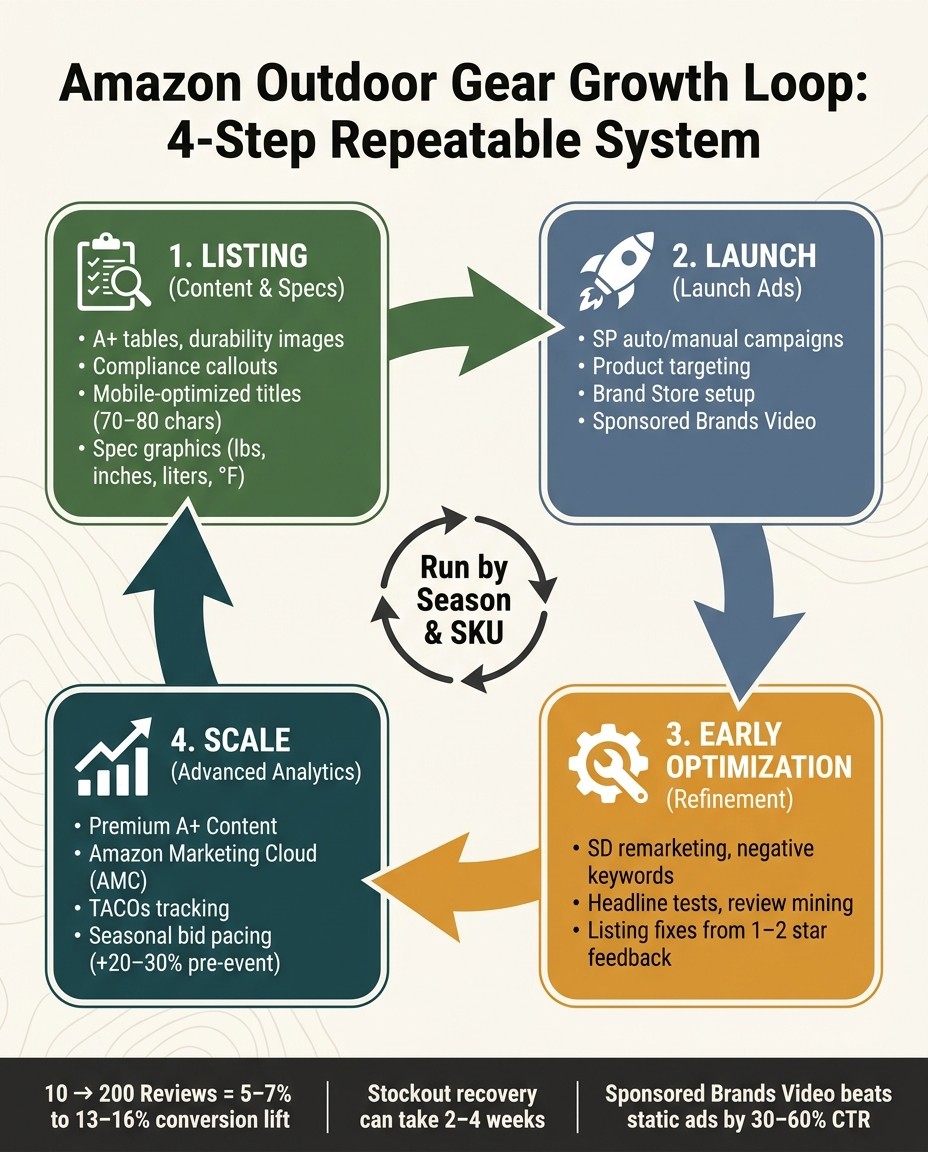
Amazon growth for outdoor gear starts to click when separate tasks stop living in separate boxes. Listings, reviews, pricing, ads, and inventory need to work as one loop. Shopper insights shape the listing. Better listings lift conversion. Higher conversion helps search rank. Ads push the winners harder. Inventory keeps that momentum from falling apart. When brands tie together listing updates, promo plans, and ad structure across search terms, titles, images, reviews, pricing, inventory, and ads, they can drive major profit and revenue gains.
Use this four-step operating sequence to turn the tactics above into a system your team can repeat without starting from scratch every time.
Growth Stage | Focus Area | Key Actions |
|---|---|---|
1: Listing | Content & Specs | A+ tables, durability images, compliance callouts |
2: Launch | Launch Ads | SP auto/manual, product targeting, Brand Store |
3: Early Optimization | Refinement | SD remarketing, negative keywords, headline tests |
4: Scale | Advanced Analytics | Premium A+, AMC for shopping journey |
The point is simple: run the loop by season and by SKU. Then back the parts that prove they convert, instead of spreading budget across everything at once.
If your outdoor catalog is growing but your Amazon ad structure feels messy, talk to Bigeye before spend slips further. Our retail media team can review campaign setup, SKU segmentation, keyword tiers, retargeting flows, and seasonal bid pacing for outdoor gear brands.
FAQs
What’s the best Amazon ad type for outdoor gear brands?
Sponsored Products are usually the best place to start because they capture shoppers with clear purchase intent. For outdoor gear, that means appearing when someone searches for a specific item like a backpacking tent, camp stove, or hiking pack.
How should I organize Amazon campaigns for tents, backpacks, and cookware?
Split campaigns by product type and separate branded from non-branded terms. That keeps budgets cleaner, makes reporting easier to read, and helps you control bids based on how each gear category performs.
Should outdoor brands still use automatic campaigns on Amazon?
Yes, but mainly for keyword discovery. Review search term reports each week, move converting terms into exact match campaigns, and block waste with negative keywords.
When should I use Sponsored Display for outdoor gear?
Use Sponsored Display when shoppers need more time before buying, especially for higher-priced products like tents or sleep systems. It works well for re-engaging people who viewed a product but left without checking out.
Related from Bigeye
Case study: Scotts Miracle-Gro

Paid Media & Performance
Oct 7, 2026
A retail media strategy for 2027 in eight steps, with Bigeye shopper research and current data on Amazon, Walmart, Instacart and measurement.