A rejected Meta ad can stop delivery at once and push a launch back by 24 hours or more. That is a direct hit to pacing, spend, and lead flow. This guide breaks down the main reasons rejected Meta ads happen, what often gets flagged in ad copy and landing pages, and how teams can cut avoidable review delays before resubmitting.
TL;DR
Meta reviews the full ad path, not just the ad itself, so landing page issues can trigger rejected Meta ads.
Health claims, personal trait wording, and hype-heavy copy are common causes of Meta ad disapproval.
Spam-like punctuation, all caps, and emoji overload can make an ad look low quality and lead to rejection.
Restricted products can run only under set rules, while blocked products cannot run at all.
The fastest fix is often tighter ad-to-landing-page alignment on offer, price, CTA, and claims.
Why Does Meta Reject Ads Even When the Product Is Allowed?
Meta reviews the entire ad. That means an allowed product can still get rejected if the copy, creative, targeting signals, or landing page breaks policy.
The first pattern to watch is copy that suggests a person is being singled out for a health issue, financial situation, or another personal trait. Even a legal, allowed offer can get blocked when the wording feels too direct.
Landing pages can also cause trouble. If a page loads slowly or feels poorly built, Meta may treat that as a user-experience and quality issue, which can hurt approval.
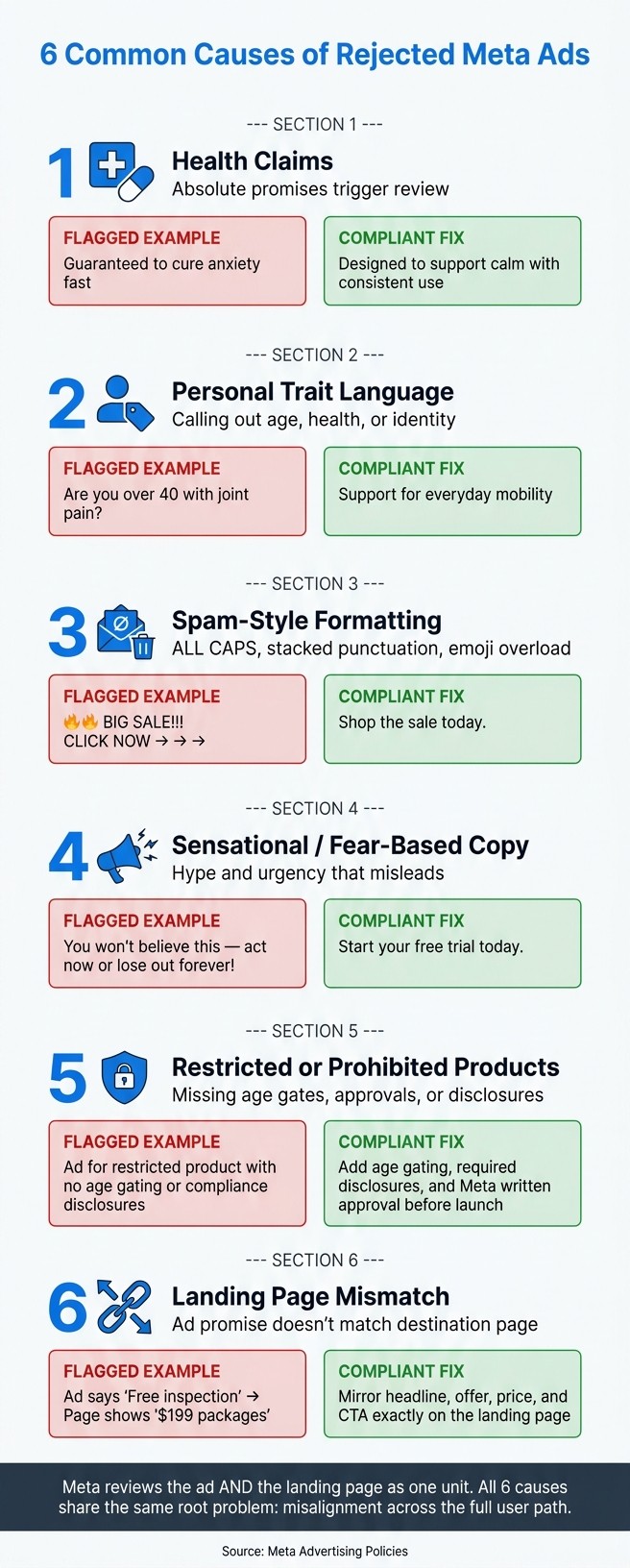
The six causes below show where ads tend to fail and how to fix each one.
Why Does Meta Flag Health Claims in Ad Copy?
Meta rejects health ad copy that leans on absolute promises such as "cure", "guarantee", or "rapid results". Those terms can make a claim sound unproven or overstated, which is where trouble starts. The fix is simple: keep the message strong, but shift to language that can be backed up.
Flagged Language | Compliant Replacement |
|---|---|
"Cure" | "Support wellness" |
"Guarantee" | "Designed to help" |
"Rapid results" | "With consistent use over time" |
That change matters because every stated health benefit needs credible evidence before submission. If an ad says a product helps with sleep, focus, digestion, or another outcome, the claim should match what the proof can support. No leaps. No big promises that the landing page cannot carry.
The landing page also needs to stay in sync with the ad. The headline above the fold should reflect the same claim, in the same measured way. If the ad says "designed to help", but the page says "guaranteed to fix", Meta may treat that gap as a policy issue.
After the health claim is supportable, the next risk is different: copy that targets the person instead of describing the product.
Why Does Meta Reject Ads That Reference Personal Traits?
Meta rejects ads that point to a viewer’s age, appearance, health, financial status, or identity. In Meta’s system, that kind of wording can signal targeting based on a protected or sensitive trait.
The fix is simple: cut trait-based “you” statements and shift the copy toward the benefit. The message should speak to the offer, not label the person seeing it.
Before: "Are you over 40 and struggling with joint pain?"
After: "Discover support for everyday mobility."
The landing page needs the same review. If trait-based wording appears there, it can trigger another rejection even when the ad copy looks clean.
AI-written drafts need a close edit before resubmission. Every line should be checked for personal-trait language, especially phrasing tied to health, age, income, or identity.
Why Does Meta Reject Ads With Gimmicky Formatting and Grammar Tricks?
Meta often rejects ads for how they look on the page, not just for what they claim. Repeated punctuation, ALL CAPS, extra symbols, odd spacing, and too many emojis can make ad copy look spammy, which can trigger disapproval.
Before: "🔥🔥 BIG SALE!!! CLICK NOW → → →"
After: "Shop the sale today."
AI-generated copy still needs a human pass. Punctuation, spacing, and spelling errors are easy to miss, and those small issues can turn a clean ad into one that gets flagged.
Before resubmitting, check each ad element:
Ad Component | Grammar & Formatting Check |
|---|---|
Primary Text | Remove extra symbols, ALL CAPS, repeated punctuation, and odd spacing |
Headline | Use clean capitalization and light punctuation |
Overlay Text | Check that overlays and captions are free of typos and do not cover key visuals |
Once the formatting is cleaned up, the next risk usually comes from copy that feels too hyped or exaggerated.
Why Does Meta Reject Ads With Sensational or Fear-Based Copy?
Meta rejects ads with sensational or fear-based copy because that kind of language can mislead people and create a bad user experience. Lines like "You won't believe this deal!" or "Everything must go - act now or lose out forever!" often get flagged before a campaign even launches.
Urgency can still work. It just needs to be specific and easy to back up. For example, "5 Science-Backed Ways to Improve Wellness" is clearer than "You won't believe this deal!" and is less likely to trigger a rejection.
Ad Element | Rejected Version | Compliant Version |
|---|---|---|
Headline | "You won't believe this deal!" | "5 Science-Backed Ways to Improve Wellness" |
CTA | "Act before the offer ends." | "Start My Free Trial" |
Visual | Shocking "before" photo | Neutral product-use image |
Landing Page | Generic homepage | Dedicated page mirroring the ad's specific offer |
Before resubmitting, check that the landing page headline and hero section match the promise made in the ad. A toned-down ad can still get flagged if the landing page swings back into hype or loaded claims. The full path has to line up. That also means adding a clear privacy policy and plain pricing details.
If the offer itself seems fine, the next step is to confirm that the product category is allowed to run ads on Meta.
Which Products and Services Does Meta Prohibit or Restrict - and How Can Advertisers Tell the Difference Before Launch?
Once copy issues are fixed, the next common problem is the offer itself. Meta blocks some products and services completely, while others can run only under tight rules. That difference matters. If an offer falls into a blocked or restricted category, both the ad and the landing page have to follow policy from top to bottom.
Prohibited items cannot run at all. Illegal drugs are a clear example. Restricted items may be allowed, but only when the advertiser meets the stated conditions. That can include following local law, turning on age gating, or getting written approval from Meta before launch.
Ad Element | Rejected Version | Compliant Version |
|---|---|---|
Ad Headline | Headline names one product category | Landing page sells a different category or a blocked offer |
Landing Page Hero | Switches to a restricted or prohibited offer | Repeats the same offer and language as the ad |
CTA | Sends users to a mismatched page | Sends users to the page the ad promises |
A simple way to think about it: the ad, the page, and the offer all need to tell the same story. If the ad promotes one thing but the page shifts into a blocked product, a restricted category with missing safeguards, or claims that need approval, the campaign is likely to fail review.
Before: An ad for a CBD supplement links to a landing page that also promotes an unapproved health claim - "clinically proven to eliminate anxiety."
After: The same ad links to a landing page that describes the product as "formulated to support calm" with no unsubstantiated clinical claims and proper age gating enabled.
Before resubmitting, check four points:
Confirm whether the product falls into a prohibited or restricted category.
Verify that age gating is turned on when the category requires it.
Make sure any needed written approval from Meta is already in place.
Check that the ad headline, landing page, and CTA all point to the same offer.
That last step often gets missed. A clean ad can still be rejected if the click lands on a page that shifts categories, adds banned claims, or promotes something the headline never mentioned.
What Happens When Your Meta Ad and Landing Page Tell Different Stories?
The last rejection trigger sits on the page itself. A landing page mismatch happens when the ad’s promise, product, or offer does not line up with what appears after the click. Meta reviews the ad and the page as a pair, so the destination page needs to back up the same claim.
An ad that promises a free same-day roof inspection in Tampa but sends people to a page titled “Premium Roofing Services - Starting at $199” creates a clear disconnect. That kind of gap can look like a bait-and-switch.
The fastest fix is simple: make the page headline, offer, and CTA match the ad. The table below shows where these gaps show up most often and how to fix them.
Element | Problem (Mismatch) | Fix (Alignment) |
|---|---|---|
Ad copy | The ad headline promises a free same-day AC repair quote, but the landing page headline shifts to affordable HVAC services - book a call. | Mirror the ad’s main promise in the page H1 or subheadline above the fold. |
Offer details | The ad says first month for $9.99 - no commitment, but the landing page changes the starting price and hides the discount in fine print. | Make the ad’s offer the main visible offer on the page, using the same price and terms. |
Page content and UX | The ad promises a simple free consultation, but the page opens with a multi-step form and pop-ups before the content. | Simplify the form, remove disruptive overlays, and keep the promised action easy to reach right away. |
Before: "Free Same-Day Roof Inspection in Tampa - Book Now" leads to a page centered on paid packages.
After: The page headline matches the ad, shows $0 today above the fold, and uses "Schedule Your Free Inspection."
Before resubmitting, review the headline, offer, product focus, and mobile load speed.
What Should You Check Before Resubmitting a Rejected Meta Ad?
Use this quick pass to catch the six issues above before resubmitting.
Before sending the ad back for review, check both the ad and the landing page one more time. Even a small mismatch can lead to another rejection.
Scan the ad copy. Watch for "you" language tied to a personal trait, claims that lack proof, and any promise the landing page does not support.
Check formatting. Remove ALL CAPS, extra punctuation, emoji overload, and special characters meant to dodge review.
Confirm the product category is allowed or restricted. Check whether the offer sits in a banned or restricted category, then add any disclosures or approvals Meta requires.
Run a side-by-side check of the ad and landing page. The headline, offer, price, and CTA should match exactly. If the ad says "First month for $19.99", that same price should appear above the fold on the landing page, and the subscription terms should be clear. The product shown in the ad should also match the product on the page. Slow mobile load times can delay approval or limit delivery, so test the full path on mobile before resubmitting.
Use this final scan to make sure the ad, page, and offer still match.
Checklist Area | What to Look For | Quick Fix |
|---|---|---|
Product category | Restricted verticals missing required disclaimers or certifications | Cross-check Meta's restricted content list and add the needed disclosures |
Landing page claims | Bigger promises on the page than in the ad; missing offer details | Match the headline, price, and CTA exactly to the ad |
Mobile experience | Slow load times, broken forms, pop-ups blocking the offer | Test on mobile, remove blocking overlays, and make sure the offer appears right away |
What Do the Six Meta Ad Rejection Causes Have in Common?
All six Meta ad rejection causes lead back to the same core problem: the ad promise, the wording, and the landing page stop lining up.
That mismatch is where trouble starts. In many cases, the ad copy sounds one way, the offer on the page shifts in another direction, and Meta treats the gap as a policy risk. Meta reviews the ad and the destination page as a single unit, so even a strong ad can get rejected if the landing page does not match what the ad suggests.
The good news is that most of these problems do not call for a full rebuild. They usually need focused fixes instead. A headline may need to be toned down. A claim may need support. A landing page may need to mirror the offer, wording, or call to action more closely.
In plain terms, the issue is less about one bad element and more about misalignment across the full user path. When the ad sets one expectation and the landing page delivers another, Meta is far more likely to step in.
If rejections keep stalling your Meta launches, talk to Bigeye. Our paid media team can look at your ads and landing pages side by side and point out what's likely to get flagged before you resubmit.
FAQs
Why does Meta reject ads even if the product is allowed?
Because Meta reviews the full ad unit, including the landing page. Allowed products can still be rejected if the copy, formatting, claims, or destination page breaks policy.
How long does a Meta ad review usually take after edits?
Many ads are reviewed within about 24 hours, but resubmission after a rejection can add more delay.
Can a landing page alone cause Meta ad disapproval?
Yes. A page with blocked claims, mismatched pricing, weak mobile UX, or a different offer can trigger rejection.
What wording is risky in Meta ads?
Hard promises, personal trait callouts, fear-based lines, and hype-heavy phrases are common risk points.
Do formatting issues matter that much?
Yes. Excess punctuation, all caps, odd spacing, and emoji overload can make an ad look low quality and increase the chance of rejection.
Related from Bigeye
Case study: The Joint Chiropractic

Paid Media & Performance
Oct 7, 2026
A retail media strategy for 2027 in eight steps, with Bigeye shopper research and current data on Amazon, Walmart, Instacart and measurement.