
Want to lower your Google Ads costs and improve ad performance? Start by fixing your Quality Score.
Quality Score is a 1-10 metric that Google uses to measure the relevance and effectiveness of your ads, keywords, and landing pages. A higher score reduces your cost-per-click (CPC) and boosts your ad placement, while a low score can lead to higher costs and fewer clicks. Here's what you need to know:
Key Takeaways:
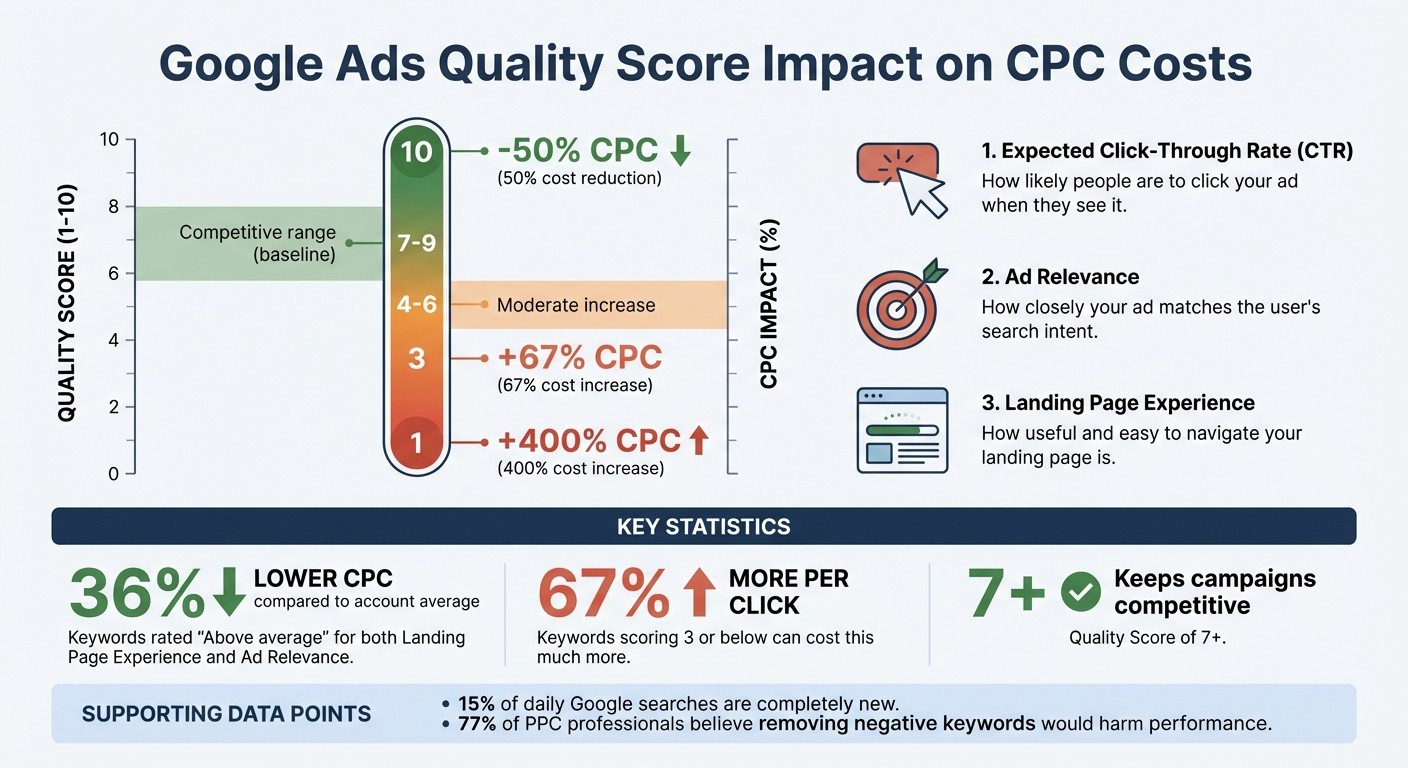
Why it matters: A Quality Score of 10 can cut your CPC by 50%, while a score of 1 can increase costs by 400%.
What impacts the score: Google evaluates three components - Expected Click-Through Rate (CTR), Ad Relevance, and Landing Page Experience.
How to fix common issues:
Improve low CTR by refining keywords, using compelling ad copy, and A/B testing.
Fix poor ad relevance by aligning keywords with search intent and creating tailored ad groups.
Address landing page problems by speeding up load times, matching content to ad promises, and optimizing for mobile users.
Remove underperforming keywords and use negative keywords to filter irrelevant traffic.
Pro Tip: Focus on high-traffic keywords with scores below 4, and ensure your landing pages deliver on ad promises for better results.
Let’s dive into actionable steps to improve your campaigns.
Low Expected Click-Through Rate (CTR) and How to Fix It
A low expected CTR can drag down your Quality Score and drive up your cost per click. Fixing this issue doesn’t just mean more clicks - it also improves your overall Quality Score. On average, CTRs across industries range between 2% and 6%, though the numbers vary: Dating & Personals leads at 6.1%, followed by Real Estate at 3.7%, eCommerce at 2.7%, B2B at 2.4%, and Technology at 2.1%.
Finding the Root Causes of Low CTR
Several factors can contribute to a low CTR. For starters, irrelevant keywords, generic headlines that fail to address user needs, and weak CTAs (e.g., using "Get Started" instead of something more specific like "Shop the Sale") can all reduce ad relevance. Broad keyword targeting, such as "digital camera" instead of "Panasonic digital camera", can also dilute your ad’s focus.
Competitive pressure is another key factor. If competitors offer better value or more engaging ad designs, your CTR may take a hit. Research supports this: headlines framed as questions can increase engagement by up to 150%, while those using numbers and urgency cues can perform up to 200% better than generic ones.
To pinpoint underperforming keywords, go to the "Keywords" section in Google Ads. Adjust your columns to include "Quality Score" and "Exp. CTR." Keywords flagged as "Below average" or "Average" in the Expected CTR column are likely misaligned with user intent. Once you identify these problem areas, you can tweak your strategy to improve both relevance and CTR.
How to Optimize Keywords and Ad Copy
Improving your CTR starts with refining your keywords and tailoring ad copy to match user intent. Focus on long-tail keywords that attract high-intent searches. Break down broad ad groups into smaller, themed groups. For example, separating "engagement rings" from "wedding bands" allows you to create more targeted ads. Use negative keywords to filter out irrelevant searches and avoid wasting impressions.
Dynamic Keyword Insertion (DKI) is another powerful tool. It automatically updates your headlines with the user’s actual search term, making your ads feel more relevant. You can implement this using the code {KeyWord:Default Text} in your ad copy.
A/B testing is essential for fine-tuning your ads. Change one element at a time - like the headline, description, or CTA - to see what resonates best with your audience. Address objections directly in your copy with phrases like "No credit card required", "Cancel any time", or "Free shipping" to reduce hesitations and encourage clicks.
Lastly, structure your campaigns around specific product types or themes. Aligning keywords tightly with ad copy ensures a stronger connection to search intent. Pair this with action-oriented CTAs that use verbs like "Buy", "Order", or "Find" to create a seamless path from search to landing page.
Poor Ad Relevance and How to Improve It
Ad relevance gauges how well your ad aligns with the intent behind a user’s search query. It’s a key component of your Quality Score, which directly affects your ad performance and costs. Google assigns ad relevance one of three labels: "Above Average", "Average", or "Below Average." A "Below Average" rating signals that your ad isn't hitting the mark for keyword intent, which can hurt your campaign results. Fixing this issue not only strengthens your message but also enhances your Quality Score, leading to lower costs.
The root cause of poor ad relevance often lies in mismatched keywords and ad copy. For example, pairing unrelated queries like "sushi delivery" and "pizza delivery" in the same ad group or using vague keywords like "waxing" instead of specific ones like "wood floor waxing" weakens your ad’s focus. Google determines relevance by analyzing the meaning of the search term, the keywords in your ad group, and the content of your landing page.
To spot issues, use the "Quality Score" filter in Google Ads to identify keywords scoring below 3. Dive into your "search terms" report to find irrelevant triggers. Remember, around 15% of daily searches on Google are completely new. Fixing these misalignments is essential for creating ads that resonate with user intent and improving your Quality Score.
Matching Keywords with Search Intent
One way to improve ad relevance is by grouping keywords into tightly focused ad groups based on a single theme or product category. For instance, instead of bundling all food-related terms together, separate "sushi delivery" and "pizza delivery" into their own groups. This allows you to write tailored ad copy that speaks directly to each audience. Swap out broad, one-word keywords for more specific phrases to better reflect your offerings:
Broad Keyword | Specific Keyword (Higher Relevance) |
|---|---|
waxing | wood floor waxing |
floors | floor waxing services |
cleaning | floor cleaning services |
Here’s a real-world example: In September 2021, SelectBlinds transitioned from exact match keywords to a broad match strategy combined with Target ROAS bidding and bid adjustments. This adjustment helped them connect with customers earlier in the buying process, resulting in a 33% revenue increase year-over-year. Similarly, Mey & Edlich, a fashion retailer, used Smart Bidding, responsive search ads, and broad match keywords to achieve a 204% jump in revenue and a 24% higher ROAS.
To maintain relevance, review your search terms report regularly. Identify irrelevant queries and add them as negative keywords. If certain keywords in an ad group don’t align well, move them into their own targeted group. Once your ad groups are tightly themed, refine your ad copy to match, as explained below.
Writing Ad Copy That Matches User Intent
After organizing your keywords, your ad copy should reflect the same level of specificity. Use the exact phrases from your keywords in your headlines and descriptions. This not only signals relevance to Google but also resonates with potential customers. For example, if your ad group focuses on "pine wood floor waxing", your ad copy should explicitly mention that term instead of offering a generic description of services.
Dynamic Keyword Insertion (DKI) can also boost relevance. By using {KeyWord:Default Text}, you can dynamically update your ad text to match the user’s search term - perfect for tightly themed ad groups.
"Ad Relevance is a metric Google Ads uses to assess how closely an ad matches the intent behind a user's search query. Essentially, it's a measure of alignment." - Tenscores
Finally, tailor your call-to-action to match where the user is in the buying journey. For example, in prospecting campaigns, use curiosity-driven phrases like "See the gameplay." For retargeting efforts, opt for direct prompts like "Unlock your offer." This ensures your ad not only grabs attention but also guides users toward the next step.
Fixing a Poor Landing Page Experience
Landing Page Experience is a key factor in Quality Score, and a poor rating can drive up campaign costs. If your rating is "Below Average", you're likely wasting budget. On the other hand, keywords rated "Above average" for both Landing Page Experience and Ad Relevance can reduce CPCs by 36% compared to the account average. The usual culprits behind poor performance? Slow load times, mismatched content, and weak mobile optimization. A well-designed landing page can boost your Quality Score as much as fine-tuned keywords or engaging ad copy. Below, we’ll explore how to address these issues by improving load speed, aligning content with ad promises, and enhancing mobile usability.
As page load times increase from 1 to 3 seconds, the chance of a user leaving rises by 32%. By 5 seconds, that probability skyrockets to 90%. 53% of mobile users abandon a page if it takes more than 3 seconds to load, and every extra 100 milliseconds of delay can cost you 7% in conversions. A slow or clunky landing page not only hurts user experience but also inflates your campaign costs.
How to Improve Page Load Speed
Several factors can drag your page’s load time, including oversized images, excessive JavaScript, and too many HTTP requests. To speed things up:
Compress images to keep file sizes under 1MB and use modern formats like WebP or JPEG.
Minify code, enable gZIP compression, and activate browser caching.
Use a Content Delivery Network (CDN) to distribute server load efficiently.
Google now evaluates landing pages using Core Web Vitals, which set the bar high. In March 2024, Google replaced First Input Delay (FID) with Interaction to Next Paint (INP) as a Core Web Vital. Here’s how Google categorizes performance:
Metric | Good (Healthy) | Needs Improvement | Poor |
|---|---|---|---|
LCP (Largest Contentful Paint) | Under 2.5s | 2.5s - 4.0s | Over 4.0s |
INP (Interaction to Next Paint) | Under 200ms | 200ms - 500ms | Over 500ms |
CLS (Cumulative Layout Shift) | Under 0.1 | 0.1 - 0.25 | Over 0.25 |
If your LCP exceeds 3 seconds, you could lose 23% of organic traffic, while an INP score over 300ms might result in a 31% drop in mobile traffic. Keep in mind that updates to your landing page may take one to three weeks to reflect in your Quality Score, as Google needs time to recrawl and gather new interaction data.
Making Sure Content Matches Ad Promises
Your landing page headline should align closely with your ad headline to create an immediate connection. Any specific offers, such as a discount or free trial, should be visible above the fold - that is, without requiring users to scroll. For instance, if your ad promotes "20% off wood floor waxing", that exact offer should be front and center on the landing page.
"The message on your landing page must be a direct continuation of the conversation started by your ad." - AGrowth.io
Avoid directing traffic to a generic homepage. Instead, create dedicated landing pages tailored to each ad group’s keywords and messaging. Incorporate your primary keywords naturally into the page’s headlines, subheadings, and body text. For example, if your ad group targets "pine wood floor waxing", that phrase should appear prominently on the page.
Check the "Landing Page Experience" column in Google Ads. If it’s marked "Below average", look for mismatches between your ad’s call-to-action and the page’s hero section. To build trust, include elements like customer reviews, transparent pricing, and a clear privacy policy - especially if you’re collecting user data.
Optimizing for Mobile Users
With over half of paid search traffic coming from mobile devices, mobile usability is a growing factor in Quality Score. A poor mobile experience - like requiring users to pinch or zoom to read content - can lead to a "Below Average" rating. To improve mobile engagement:
Place your primary calls-to-action (CTAs) above the fold.
Minimize form fields to make conversions easier.
Use tools like Google’s Mobile-Friendly Test to ensure text is readable, tap targets are large enough, and navigation is easy to use.
Make sure your site is designed for "thumb-friendly" navigation, with key buttons positioned within easy reach of a smartphone user’s thumb. Speed optimizations are even more critical for mobile, where network performance can vary widely.
"A seamless, relevant, and user-friendly landing page can be the deciding factor between a conversion and a bounce." - AGrowth.io
Fixing Low Quality Keywords
Low-quality keywords can hurt your campaigns by generating impressions without clicks, which drags down your CTR and Quality Score. If a keyword scores 3 or lower on Google’s 1-10 scale, it’s a warning sign - it could be costing you 67% more per click compared to neutral benchmarks, with costs rising significantly as scores drop. To address this, focus on identifying weak keywords, using negative keywords to refine traffic, and researching more effective high-intent terms.
How to Identify Underperforming Keywords
Start by examining the Quality Score column in the "Keywords" tab of Google Ads. Keywords with a score of 1-3 should be optimized or removed. Pay attention to the three score components: Expected CTR, Ad Relevance, and Landing Page Experience. If any of these are marked "Below average" or "Average", it points to specific areas needing improvement.
Set filters to flag keywords with Quality Scores under 3 or CTR below 1%. A high number of impressions with few clicks often means the keyword is too broad or irrelevant. For example, single-word keywords like "waxing" are often too vague and underperform compared to more specific phrases like "wood floor waxing". Use the "Search terms" report to identify keywords that dilute performance.
Adding the "Quality Score (hist.)" column can help track changes over time and pinpoint when performance started to decline. Additionally, if an ad group contains more than 10-25 keywords, breaking it into smaller, tightly themed groups can make your ad copy more relevant.
"Generally, single-keyword-ad-groups may begin to perform poorly over time if the machine-learning-systems cannot infer a matched intent between the campaign/landing-page details, and user search-behavior."
Celebird, Diamond Product Expert
Finally, refine your targeting by excluding irrelevant search terms with negative keywords.
Using Negative Keywords to Filter Traffic
Negative keywords act as a filter to stop your ads from showing up in irrelevant searches. This improves CTR and Ad Relevance, which are two key components of Quality Score. In fact, 77% of PPC professionals believe that removing all negative keywords would harm performance.
Unlike positive keywords, negative keywords don’t automatically match close variants like plurals or misspellings. You’ll need to manually add variations. Regularly review your "Search Terms" report to find queries that drive high costs or impressions without conversions, and add those as negatives. N-gram analysis can help you break down search queries into smaller chunks to uncover patterns of wasted spend.
You can apply negative keywords at the account, campaign, or ad group level for precise control. For example, if you sell only men’s shoes, adding "women" as a negative keyword can save you from wasted clicks. Google Ads allows up to 20 shared negative keyword lists per account, each holding up to 5,000 keywords. Performance Max campaigns now support up to 10,000 negative keywords as of March 2025.
"If you don't have time to review everything, start with the search terms getting the most impressions - then move on to the ones costing you the most."
Adam Gorecki, Intigress
Once irrelevant traffic is filtered, focus on improving your keyword strategy.
Conducting Better Keyword Research
Effective keyword research is essential for finding high-intent terms. Use tools like Google Keyword Planner to discover relevant keywords by entering your product, service, or website URL. This tool provides keyword ideas along with data on search volume and competition. Prioritize 2-3 word phrases over single words - they’re more specific, face less competition, and typically convert better.
When describing your product or service, think like your customers. Replace broad terms like "waxing" with more specific ones like "wood floor waxing services." Incorporate brand names for high-intent traffic, and include variations like "athletic shoes", "sneakers", and "sports shoes" to capture diverse search behaviors. However, avoid being too specific (e.g., "wedding venues for small weddings"), as this can result in very low search volume.
Group keywords into small, tightly related categories based on products or services. This ensures your ad copy aligns better with user intent and your website’s structure. For high-intent terms, use exact match to maintain control over who sees your ads. Google recommends adding at least 3 negative keywords per ad group to filter out irrelevant traffic.
"Keywords of 2 or 3 words (a phrase) tend to work most effectively."
Google Ads Help
Conclusion
Quality Score serves as a guide to identify and fix weak spots in your campaigns. By concentrating on the three components (Expected CTR, Ad Relevance and Landing Page Experience) plus the quality of your keyword list, you can tackle the issues that waste your budget and limit your campaign's potential.
Start with impactful changes. Focus on high-traffic keywords scoring below 4/10, and use tightly organized ad groups to align your ads with user intent. Make sure your landing pages deliver on the promises in your ads, and routinely remove underperforming keywords that hurt your account's historical metrics.
You don’t need to aim for perfection with every keyword. As Hugo Arias-Benamou from LanderMagic puts it:
"The goal isn't necessarily to chase a perfect 10/10 on every keyword. It's about mastering the art of creating a seamless, valuable journey for your users".
Aiming for a Quality Score of 7 or higher keeps your campaigns competitive without overspending. On the flip side, scores of 3 or below can result in paying up to 67% more per click.
Beyond creative tweaks, technical performance plays a huge role. Fast-loading pages, mobile-friendly designs, and clear message alignment between ads and landing pages are essential. Google’s AI now evaluates user experience before displaying ads, making these technical elements even more critical.
If your CPCs keep climbing and you can't tell which of the three components is dragging your scores down, talk to Bigeye. Our paid search team can review your keywords, ads and landing pages and show you where the score is leaking.
FAQs
How fast can Quality Score improvements lower my CPC?
Improving your Quality Score can lead to a 30-50% reduction in CPC within just 2-3 months. How quickly you see these results depends on the strategies you implement and your current Quality Score. By consistently refining ad relevance, selecting the right keywords, and enhancing your landing pages, you can speed up these improvements.
Should I pause keywords with a Quality Score under 4?
Pausing keywords with a Quality Score below 4 is often a smart move. Low scores typically indicate weak relevance or performance, which can lead to higher costs and lower ad visibility. By sidelining these underperforming keywords, you can focus your budget on better-performing ones, boosting your campaign's efficiency and results.
Which landing page fixes boost Quality Score the most?
To boost your Quality Score, focus on two key elements: relevance and user experience. Start by ensuring your landing pages closely match the content of your ads. This alignment helps users find exactly what they're looking for, which keeps them engaged.
Next, prioritize speed and accessibility. A fast-loading page not only keeps visitors on your site but also signals to search engines that your page is user-friendly. And don’t forget mobile optimization - your page should look and function seamlessly on any device.
By tailoring your landing pages to match your campaign goals, you can meet user expectations more effectively, leading to a noticeable improvement in Quality Scores and overall campaign performance.
Related from Bigeye
Service: Paid Media and Performance Marketing
Case study: Luma & Leaf

Paid Media & Performance
Oct 7, 2026
A retail media strategy for 2027 in eight steps, with Bigeye shopper research and current data on Amazon, Walmart, Instacart and measurement.